
Cross-Server Sync Phantom Pro
Run more than one Discord server? Cross-Server Sync chains them together so configuration and moderation actions propagate automatically. Originally built for "primary + secondary" franchise networks, it's now the way to manage any group of related servers from one place.
Phantom Pro feature
Cross-Server Sync is a Phantom Pro feature. Phantom Pro is £4.99/month or £49.99/year and covers one server. On a Free server the dashboard page opens to a locked view with an upgrade link, and the feature stays switched off in Discord until you subscribe from Plans & Billing.
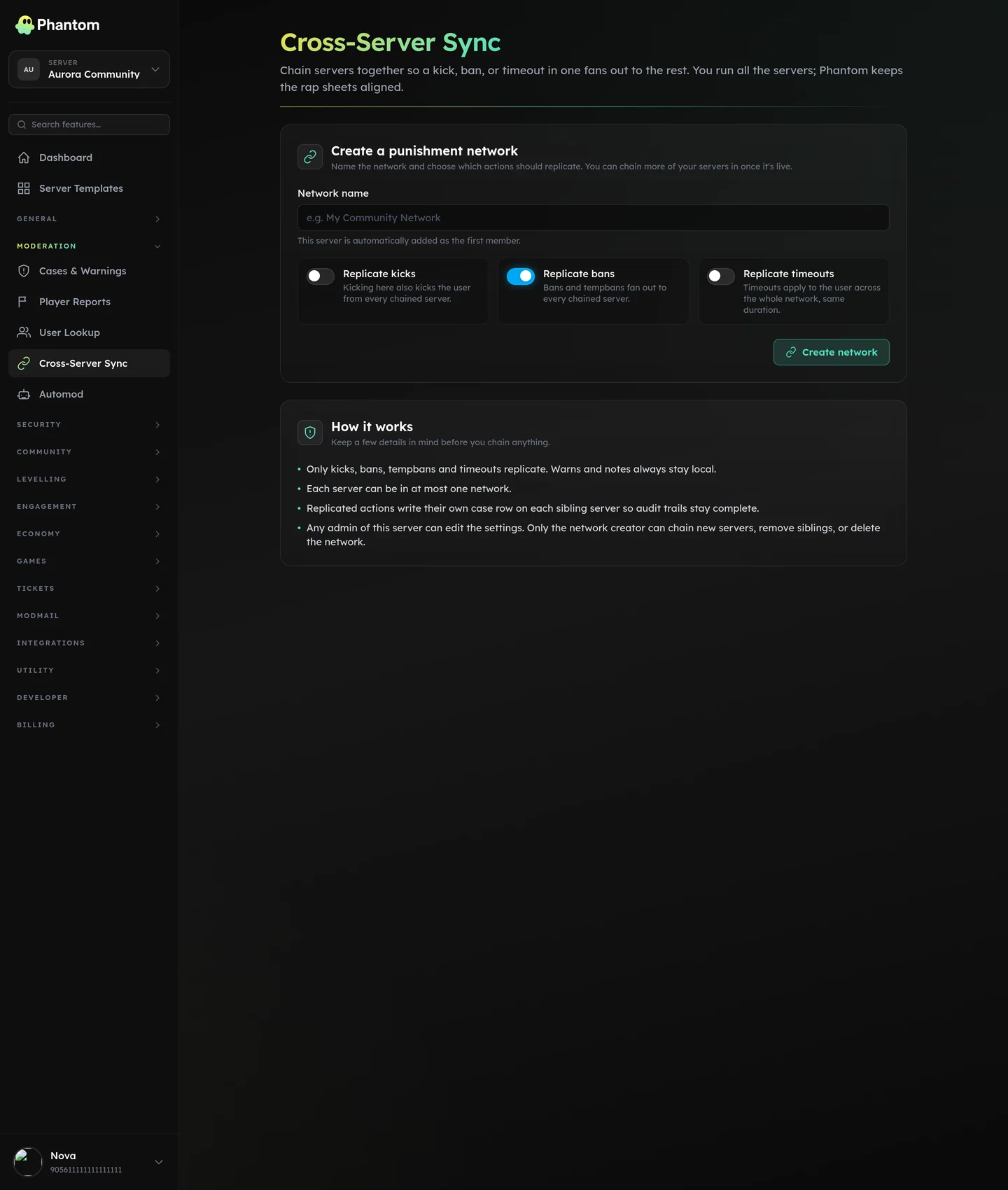 Moderation → Cross-Server Sync.
What can sync
Three independent toggles:
- Moderation cases — kick, ban, tempban, timeout on any server fan out to every chained server. (Warns and notes always stay local.)
- Automod rules — keyword lists, regex patterns, thresholds, and actions defined on the source server propagate to every subscriber. Channel/role references resolve per-server via handles.
- Security tunables + firewall rules — anti-raid, anti-scam, anti-nuke settings + the entire firewall rule set propagate from source to subscribers. Channel/role bindings stay local per server.
- Team Roles — team-role definitions (label + permission set) sync to subscribers; each subscriber's owner binds them to a local Discord role.
You opt into each independently — a network can sync just moderation cases, or just automod, or all four.
Where it lives
Dashboard: Moderation → Cross-Server Sync.
Creating a network
- Pick the server that'll be the source (the one whose config is authoritative). Open Cross-Server Sync on it.
- Name your network (e.g. "My Franchise Network").
- Tick which moderation cases should propagate (
banis the most common default). - Save.
The current server is automatically added as the first member. You can chain more members from the Chained servers section using the "Add one of your other servers" dropdown — only servers where you have Discord Administrator AND Phantom is installed show up.
Turning on Config Sync
Once you have ≥2 servers in your network:
- In the Config sync card, tick Sync automod rules and/or Sync security settings and/or Sync team roles.
- Pick the Source server (the one whose config flows outward).
- Save.
The source's current config is not auto-replayed to existing subscribers (so you don't accidentally splat their existing rules). Use the Replay section to push the current source state to a specific subscriber.
Handles
Automod and firewall rules reference Discord channels (e.g. "exempt #mod-chat") and roles (e.g. "@Moderator is exempt"). Channel and role IDs are different on every server, so a literal copy would silently fail on subscribers.
Handles are logical names that decouple this. Define a handle like mod_log once on the network; each subscriber binds it to its own concrete channel ID.
Setting up handles
- In the Network handles card, click Add handle. Pick a name (
mod_log,mod_role,muted_role,scam_alertsare typical), kind (role / channel / category), optional description. Save. - On each subscriber server (open the same page from the dropdown), enter the local Discord ID for each handle in the input next to the handle row. Click Bind.
- Now when a rule's config references
@mod_logon the source, the subscriber writes its own local channel ID.
If a subscriber hasn't bound a handle the rule needs, the push for that rule is deferred — the Change Log records skipped_missing_handles, and a banner on the subscriber's dashboard tells them which handles to map.
Replay
A "fresh copy" of the source's current state. Use it when:
- You just added a new server to the network and want to backfill all the existing rules onto it.
- You've drifted and want to reset a subscriber back to the source's authoritative state (overrides are still respected).
In the Replay config to a server card, pick the target, click Replay automod or Replay security. The Change Log fills with one entry per rule per push.
Override locally
A subscriber's owner can take ownership of one specific rule or one specific security feature on their server. Open the relevant page (e.g. Anti-Raid, or click a synced automod rule), click Override locally. The rule becomes editable; future pushes for that rule skip this server.
Click Re-sync to clear the override and resume syncing.
Permissions to manage the network
- Anyone with Discord Administrator on the active server can edit the network's name + replication toggles.
- Only the network owner (the Discord user who created the network) can:
- Add or remove sibling servers
- Delete the entire network
- Change the source guild
- Add/delete handles
- Trigger Replay
- Each subscriber's local Discord Administrator can bind handles for their own server.
Removing a server from the network
In the Chained servers list, click the trash icon. The server stops receiving sync, its synced rules stay in place but become local-only, bindings + overrides for that server are cleaned up, and case replication stops immediately.
If the source server is removed, the network's sync toggles (automod / security / team roles) auto-disable until the owner picks a new source.
Limits & behaviour
- One server can be in at most one network at a time.
- One Discord user can own at most one network (keeps the UI honest).
- Pushes are independent per-subscriber: a failure on one server doesn't stop the push reaching the others.
- Subscribers see provenance in their Change Log on the same page (the last 50 push attempts with action, target, and result).
How it's not a "shared brain"
Each subscriber has its own copy of the synced rules. That means:
- A subscriber can override one rule without affecting the rest of the sync.
- Leaving the network leaves the rules in place; nothing breaks.
- Each server evaluates its own rules locally — there's no live "lookup" across servers that could slow things down.
Related pages
- Cases & warnings — the moderation-case side
- Automod overview — what gets synced
- Security overview — what's syncable on the security side
- Team Roles — the permission model that can also sync