
Quarantine
A reversible "isolate this member" action that strips their roles, gives them a single Quarantine role, and lets staff release them later. The safer alternative to a fast-trigger ban.
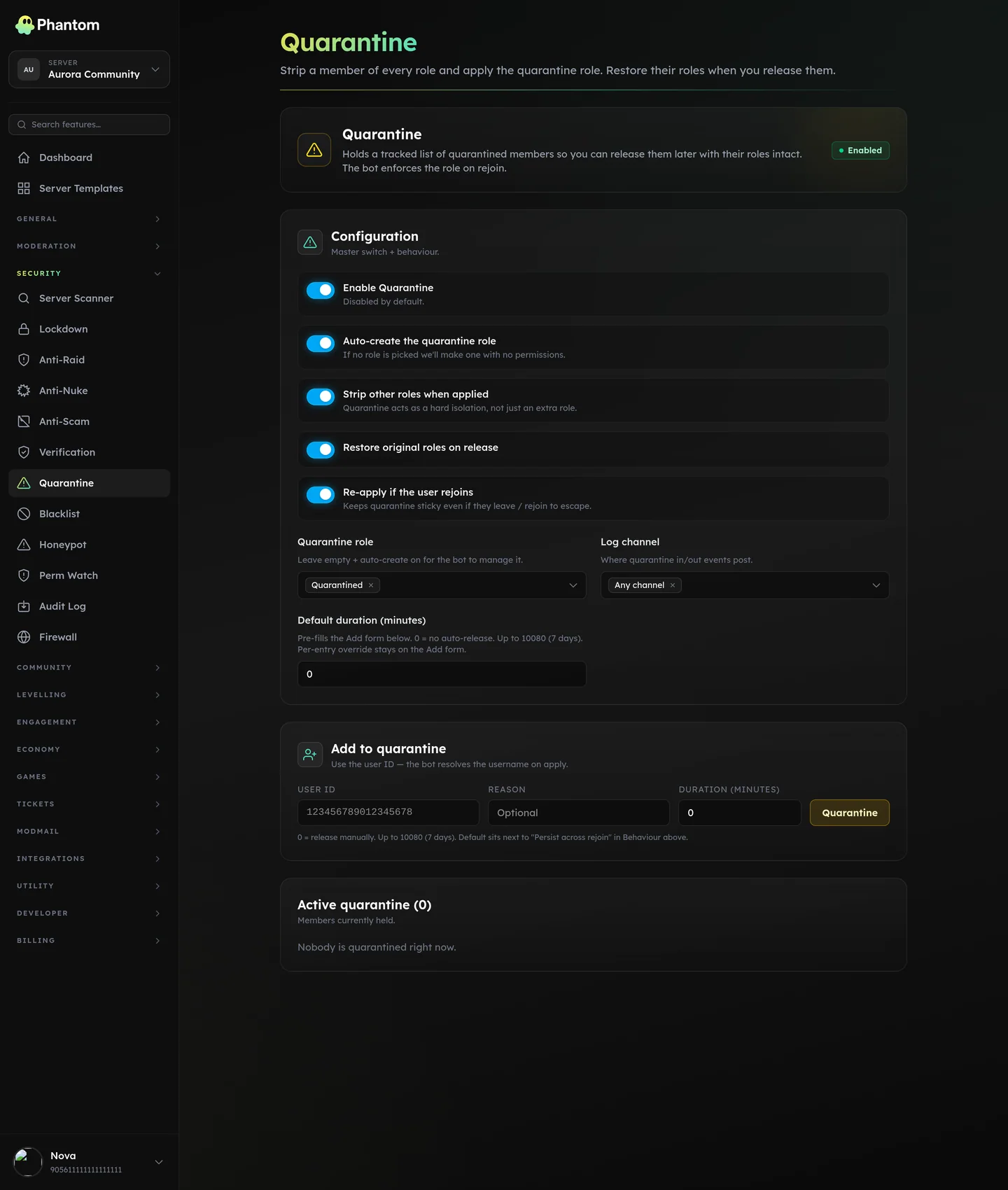 Security → Quarantine.
Why quarantine instead of ban
- Reversible. Wrong call? Click release. They get all their roles back.
- Survives rejoin. If they leave and rejoin, the quarantine is re-applied so they don't bypass it.
- Time-bounded. Set an auto-release in N minutes/hours; or leave it indefinite for manual review.
- Audit-friendly. Every quarantine action is logged with reason + actor.
Settings
| Setting | What it does |
|---|---|
| Enabled | Master switch. |
| Quarantine role | The single role given to quarantined members. They should have access to nothing except a Quarantine channel where you can talk to them. |
| Log channel | Where quarantine + release events post. |
| Auto-create role | If the Quarantine role doesn't exist, Phantom creates it. Default ON. |
| Remove other roles | Strip every other role on quarantine. Default ON. (This is what makes them "isolated" — without it, they keep their existing access.) |
| Restore roles on release | Restore the original role list on release. Default ON. Backed by the same engine that powers Role Persistence. |
| Persist across rejoin | If they leave and rejoin, re-apply quarantine. Default ON. |
| Default duration | Pre-fills the duration input on the manual quarantine form. 0 = no auto-release. |
How to set up
- Open Security → Quarantine.
- Either pick an existing Quarantine role or leave it blank and let Phantom auto-create one.
- In Discord, set the Quarantine role's permissions to deny everything except viewing the #quarantine channel (or whatever you name it).
- Set channel-by-channel overrides on the rest of your channels to deny the Quarantine role.
- Enable and save.
Quarantining a member
Three ways:
- Manually from the dashboard — Security → Quarantine → Add member.
- From User Lookup — pick the member → Quarantine button.
- Auto-quarantine — when Anti-Raid or Firewall action is
quarantine.
Releasing
Click Release on the dashboard. Their original roles come back (if restore_roles_on_release is on) and the Quarantine role is removed. They get a DM if your Anti-Scam-style DM-on-action is enabled.
Limits
- 5,000 quarantined users tracked at once (older auto-prune).
Permissions
security.view— see the listsecurity.edit— quarantine + release
Behaviour
- The member's original roles are snapshotted on quarantine and restored on release.
- A quarantined user who leaves and rejoins is re-quarantined automatically (if
persist_across_rejoinis on). - Auto-release fires within a minute of the expiry.
Related pages
- Anti-Raid — auto-quarantine source
- Firewall — auto-quarantine via join-time rules
- Role Persistence — same idea applied to normal joins