
Partnerships
Manages outbound partnerships with other Discord servers — applications, approval queue, showcase channel, optional join attribution.
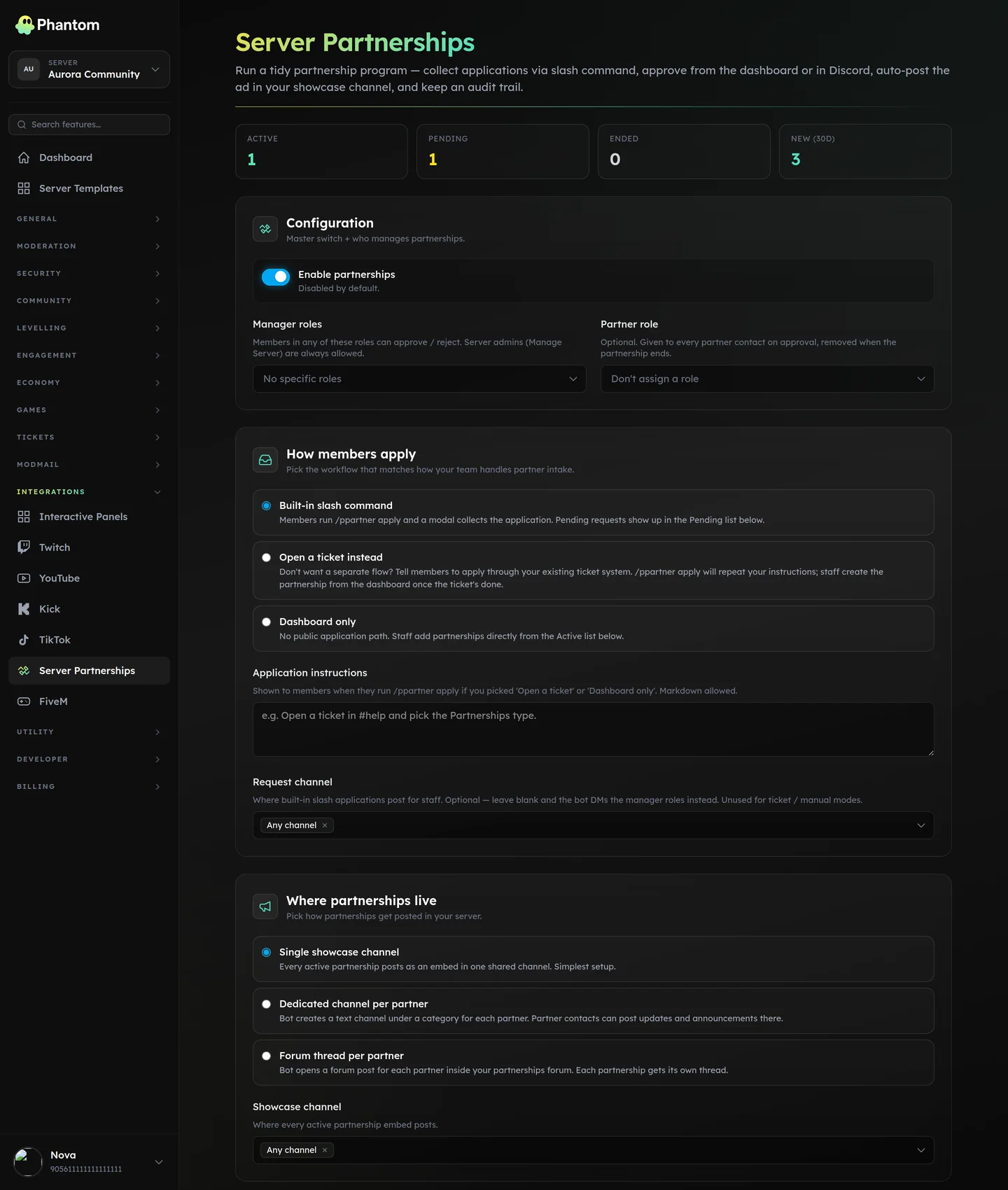 Integrations → Partnerships.
How it works
- Another server's representative submits a partnership application (via
/ppartner apply, a panel button, or your dashboard's manual entry). - Staff review on the dashboard.
- Approved partnerships get listed in your showcase — either a single shared channel, one channel per partner, or a forum thread per partner (configurable).
- Optional: when a member joins via a partner's invite, Phantom attributes them to the partnership for stats.
Where it lives
Dashboard: Integrations → Partnerships.
Slash commands
/ppartner apply— member-side submission flow.
Staff actions are entirely dashboard-driven.
Channel modes
| Mode | What it does |
|---|---|
| Single channel | All approved partner ads live in one configured channel. Cleanest for small partner lists. |
| Channel per partner | Each partner gets a dedicated channel auto-created. Good for big networks. |
| Forum per partner | Each partner gets a forum thread in a configured parent forum. Lower channel-count cost. |
Application flow
Three application sources, configurable:
slash— via/ppartner apply(anyone can submit)ticket— via a ticket type designed for partnershipsmanual— staff add partners directly via the dashboard
Settings
| Setting | What it does |
|---|---|
| Application mode | One of the three above. |
| Channel mode | One of the three above. |
| Manager role IDs | Roles whose holders can approve/deny applications. |
| Partner contact role ID | Role granted to a partner's primary contact when their partnership is active. |
| Min partner member count | Reject partner applications whose servers have fewer than N members. 0 = no minimum. |
| Application cooldown (hours) | Same applicant can re-apply only after this delay. Default 24. |
| Max active | Cap on concurrent active partnerships. 0 = unlimited. |
| Bump interval (days) | Partners can re-post their ad after this many days (preventing showcase spam). |
| Track joins | When on, members joining via a partner's invite are attributed. |
Permissions
partnerships.view— see applications + active partnerspartnerships.edit— approve / deny / bump / end / configure
Tips
- Set a
min_partner_member_countof at least 100 to filter out tiny-server applications. - Use forum mode if you have 50+ partners — single-channel becomes a wall of ads.
- The
partner_contact_roleis useful for permission gating (e.g. partners can post in a partners-only voice channel).
Limits
- 100 active partnerships
- 250 pending applications
- 500 blacklisted servers (auto-deny on re-apply)
Related pages
- Tickets — when application mode =
ticket - Invite Tracking — separate system, related concept