
Cases & warnings
Every disciplinary action Phantom takes — a warning, a kick, a ban, a timeout — gets a case row. Cases are searchable, editable, deletable, exportable, and they drive Phantom's escalation logic. If you're coming from a stack of separate bots where each one had its own private mod log, this is the unified replacement.
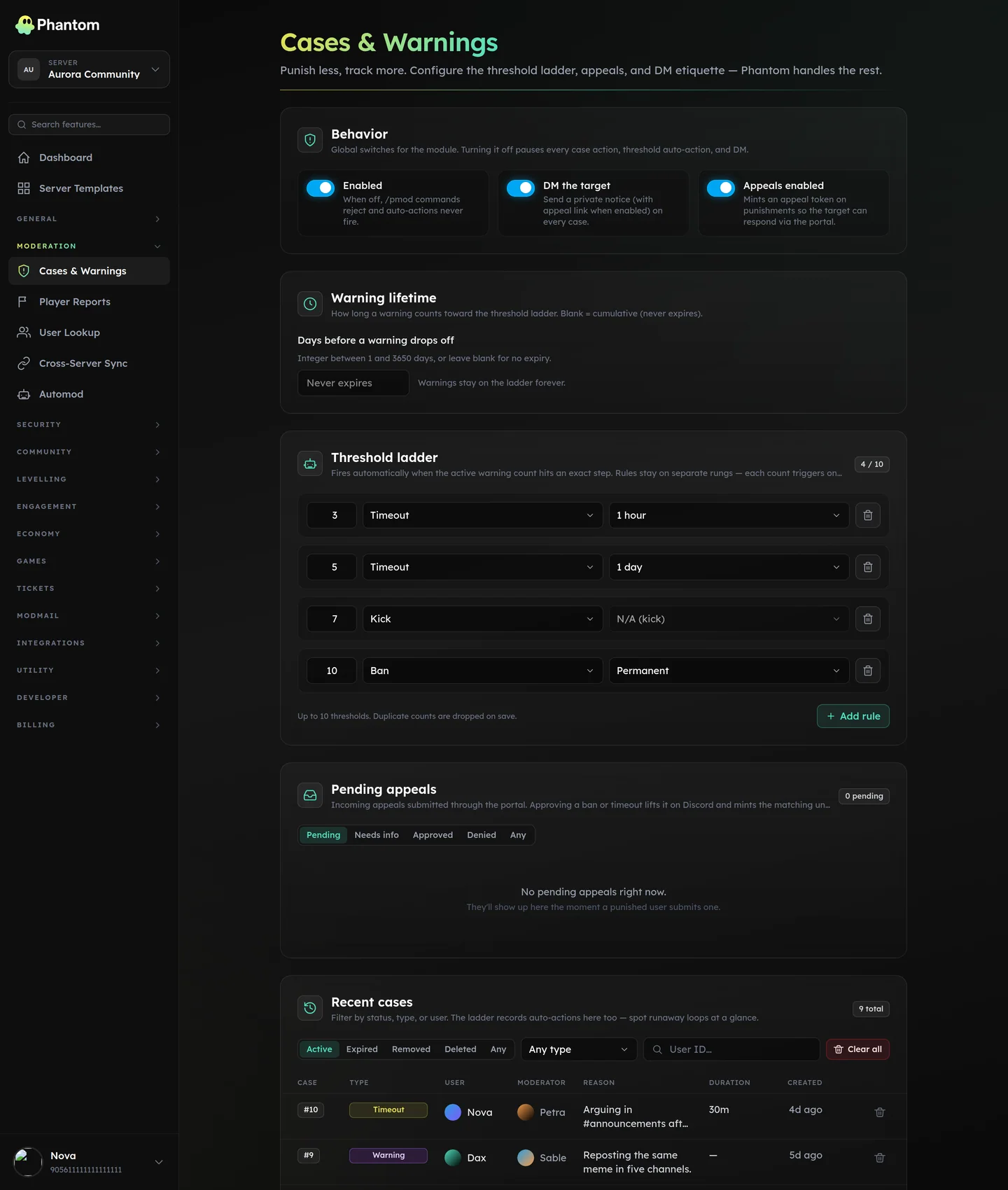 Moderation → Cases & Warnings, with the threshold ladder and the case list.
Case types
| Type | Notes |
|---|---|
warn | Lightweight. No Discord-side action; just a recorded warning that counts toward the escalation thresholds. |
timeout | Discord timeout. Auto-lifts at the duration. |
untimeout | Manually lift a timeout early. Counts as a status-change case, no new strike. |
kick | Kick from the server. |
ban | Permanent ban. |
tempban | Time-limited ban. Auto-unbans when the duration elapses. |
unban | Reverse a ban. Status-change case, no strike. |
note | Mod-internal annotation. Never DM'd to the user. |
clear_warnings | Bulk-clears a user's warning count. Status-change case. |
Where it lives
Dashboard: Moderation → Cases & Warnings. Bot commands: the /pmod group.
Slash commands
Case actions
/pmod warn— issue a warning/pmod timeout— timeout for a duration (10m,2h30m,1d)/pmod untimeout— lift an active timeout/pmod kick— kick/pmod ban— ban (optionaldelete_daysfor message cleanup)/pmod tempban— ban with a duration/pmod unban— reverse a ban/pmod note— internal note (not DM'd)/pmod clearwarnings— wipe a user's warning count
Case management
/pmod case <id>— open one case/pmod history <user>— full history of cases for one user/pmod warnings <user>— just the active warnings/pmod active <user>— active timeouts + tempbans/pmod editcase <id>— edit reason / notes/pmod deletecase <id>— delete a case row/pmod notes <case>— add an internal note to an existing case
Purge (bulk delete)
/pmod purge all|user|bots|humans|contains|embeds|attachments|links|mentions|reactions|images|videos|stickers|before|after|between|silent|older
Each filter scopes the delete. silent skips the confirmation embed; older extends past Discord's 14-day bulkDelete limit (deletes one-by-one — slow).
Permissions
Per-action permissions, configurable via Team Roles:
moderation.warn,.kick,.ban,.unban,.timeout— gate individual actionsmoderation.case_edit— edit / pin / delete cases from the dashboardmoderation.edit— meta-grant that implies all the abovemoderation.view— read cases only
Warning thresholds (auto-escalation)
Open the Thresholds section on the Cases page. Each row says "at N warnings, do X for Y duration":
| Warnings | Action | Duration |
|---|---|---|
| 3 | timeout | 10m |
| 5 | timeout | 1h |
| 7 | kick | — |
| 10 | tempban | 7d |
You can configure up to 10 threshold steps. When a user hits a threshold, Phantom auto-fires the action with reason "Auto-escalation: 5 warnings". The action lands as a regular case row, attributable to "Phantom (auto)".
Warning lifetime is also configurable (default: warnings count for 90 days, then drop off the escalation tally — they stay on the case row for history).
DM-on-action
If enabled in Guild Settings (default: on), the actioned user receives a DM with the action type, reason, and (for tempbans/timeouts) the duration. If their DMs are closed Phantom logs the failure silently in the case row.
Appeals
Optional. When enabled, banned/timed-out users get a one-time appeal link in the DM. The link opens a public form on phantombot.gg/appeals/{token} where they fill in a statement (max 4000 chars). Submitted appeals land on the dashboard for staff review.
Appeals don't auto-unban — staff decide. The original action stays in place until then.
Limits (factual)
reason_max= 1000 charsappeal_statement_max= 4000 charstimeout_max_seconds= 28 days (Discord's cap)tempban_max_seconds= 365 days (Phantom's cap; Discord itself has none)- 10 threshold steps
Common workflows
A repeat troll
/pmod warn(1st warning) — case #103/pmod warn(2nd) — case #109/pmod warn(3rd) — case #115 → auto-escalates to a 10-minute timeout (case #116)- They come back the next day, post slurs →
/pmod ban
Editing a case
The mod who issued the warning made a typo in the reason. Open /pmod editcase 109 (or click into it on the dashboard) and edit the reason. The original timestamp stays; the edit is logged in the case's internal notes.
Cross-server propagation
If you've enabled Cross-Server Sync with sync_ban, a ban issued on the primary server fans out as a ban on every sister server. Each sibling gets its own case row attributed to "Phantom (synced from the network)".
Related pages
- User Lookup — one-shot view of every case + role history for a user
- Automod — automated rule-based moderation that produces cases
- Cross-Server Sync — propagate moderation across a network
- Team Roles — who can do which mod action