
Pricing & Phantom Pro
Free plan + optional Pro
Phantom has a free plan that covers the core of the platform — moderation, automod, security, tickets, and much more. Phantom Pro is an optional per-server upgrade — £4.99/month or £49.99/year (about 2 months free) — that unlocks the power features.
Phantom Pro is live. The early-access period, when every server had the Pro feature set for free, has finished. Pro features and the free-plan caps below are now enforced on every server. Subscribe from Plans & Billing in the dashboard.
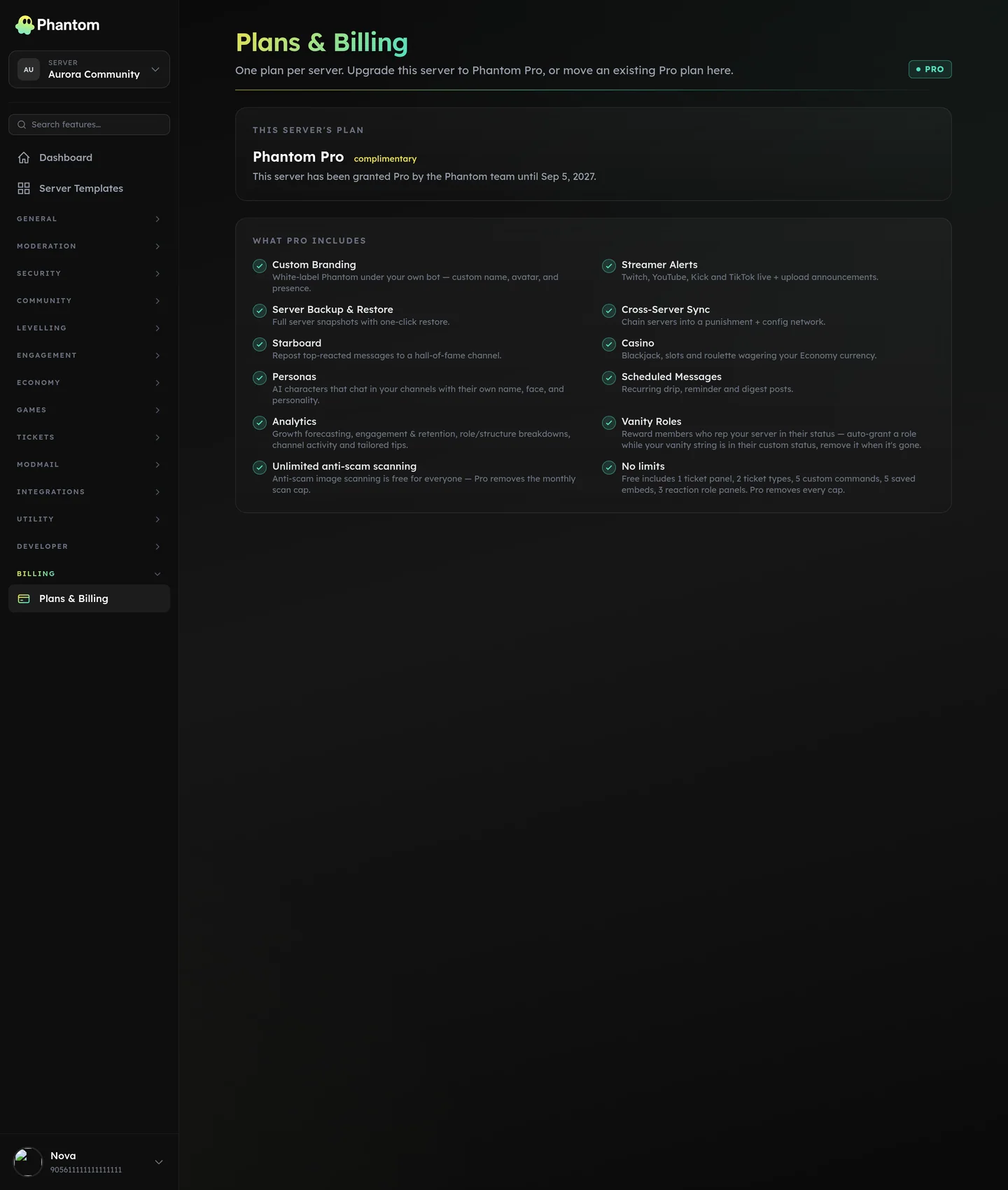 Billing → Plans & Billing, where you subscribe, transfer or cancel Pro.
The free plan
The free plan is the core of Phantom — no card, no trial clock. It covers:
- All moderation tools — cases, warnings, the full
/pmodcommand set. - The complete automod module — all 8 categories, unlimited rules within the system limits.
- The security suite — verification, anti-raid, anti-nuke, server scanner, lockdown, firewall, quarantine, honeypot, audit log, and more.
- Anti-Scam image scanning — free servers get a monthly allowance of 250 scans; Pro is unlimited.
- The tickets module — 1 panel and 2 ticket types on free; Pro is unlimited.
- Levelling, Economy, Giveaways, Polls, Suggestions, Reviews, Trivia, Counting, Birthdays.
- Community tools — welcome, reaction roles, role requests, join roles, role persistence, temp roles, temp channels, channel stats, invites, sticky messages, modmail.
- Partnerships, FiveM, Server Templates.
- Custom Commands, Embed Builder, Interactive Panels (with free-plan quantity caps — see below).
- The full Fun & Utilities command set — info, personal tools, lookups, calculators, utility tools, text tools, fun and random commands.
- The web dashboard, the audit logs, the team-roles permission system.
What Phantom Pro unlocks
Pro is per-server: £4.99/month or £49.99/year (about 2 months free). One plan covers one Discord server, and it follows you, not the server — you can move it between servers you manage from the dashboard. Pro unlocks:
- Custom Branding — white-label Phantom under your own bot: custom name, avatar, and presence.
- Streamer Alerts — Twitch, YouTube, Kick and TikTok live + upload announcements.
- Server Backup & Restore — full server snapshots with one-click restore (not yet generally available).
- Cross-Server Sync — chain servers into a punishment + config network.
- Starboard — repost top-reacted messages to a hall-of-fame channel.
- Casino — blackjack, slots and roulette wagering your Economy currency.
- Scheduled Messages — recurring drip, reminder and digest posts.
- Persona — AI characters with custom personalities that chat in your channels.
- Vanity Roles — reward members who put your server in their status (rolling out — see the page for status).
- Advanced Analytics — growth forecasting, engagement & retention, role/structure breakdowns, channel activity and tailored tips.
Pro also lifts the free-plan quantity caps:
| Feature | Free | Pro |
|---|---|---|
| Ticket panels | 1 | Unlimited |
| Ticket types | 2 | Unlimited |
| Custom commands | 5 | Unlimited |
| Saved embeds | 5 | Unlimited |
| Reaction role panels | 3 | Unlimited |
| Anti-Scam image scans | 250 / month | Unlimited |
How to subscribe
- Open the dashboard and pick the server you want to upgrade.
- Go to Plans & Billing in the sidebar.
- Choose monthly or yearly and check out through Stripe.
- Pro unlocks on that server within seconds of the payment clearing.
Card details never touch Phantom — checkout, invoices and cancellation all run through Stripe's own hosted pages. The Manage billing button on the billing page opens the Stripe customer portal, where you can change your card, download invoices, or cancel.
Moving Pro to another server
A plan unlocks exactly one server, but it belongs to you rather than to the server. On the billing page, use Transfer on any active plan to move it to another server you manage that has Phantom installed.
- The server you move Pro away from drops to Free immediately.
- You can't transfer onto a server that already has its own active plan or complimentary Pro.
- You can't transfer a plan whose latest payment hasn't gone through — resolve it first, then move it.
- Transfers don't cost anything and don't restart your billing period.
If the old server used a custom bot
Custom Branding is a Pro feature, so your own bot can only serve a server while that server has Pro. Moving the plan therefore moves what your bot is allowed to do:
- The server you moved Pro away from stops being served by your custom bot, and the main Phantom bot takes over there immediately. Nothing is deleted, and every setting is still there if Pro comes back.
- Make sure the main Phantom bot is still in that server. If you removed it when you set up custom branding, re-invite it, or the server is left with no bot.
- You can connect that same bot to the server the plan moved to, from Custom Branding. One bot application serves one server, so connecting it to the new server disconnects it from the old one — Phantom does that for you and says so, as long as the old server no longer has Pro.
- If both servers have their own Pro plans, one bot application still can't serve both. Create a second Discord application for the second server.
What happens if a plan lapses
Nothing you've configured is ever deleted. When a server drops to Free:
- Pro pages lock, and Pro features stop running in Discord.
- Every setting stays exactly as you left it and resumes the moment the server is Pro again.
- Rows already above a Free cap — say six custom commands — are kept, not trimmed. You just can't add more until you're back on Pro.
A failed payment doesn't lock you out on the first try. Stripe retries a declined card for up to two weeks, and Phantom keeps Pro running for that whole window. The plan is flagged on the billing page and on a banner across the dashboard while that's happening, so a card that quietly expired can't take Pro down without warning.
When a payment doesn't go through
Two different things can go wrong, and the dashboard tells them apart because what you should do about them is completely different.
Card declined. Stripe tried the card and it failed. You'll see Card declined with the date. Stripe retries a declined card for up to two weeks; update your card in the billing portal and Pro carries on.
Renewal unconfirmed. Your renewal date passed and we never got a straight answer from Stripe about it. That can mean the payment failed and we missed it, or that our copy of your subscription lost track of one that is perfectly healthy. We re-check with Stripe the moment you open Plans & Billing, and again every hour. If it still says this after that, and your card was charged, it's ours to fix: contact support and quote the plan number shown on the page. Don't re-subscribe — you'd be billed twice.
In both cases:
- The billing page shows the state, the date, and the exact date Pro pauses if it isn't resolved.
- A banner appears on every dashboard page for that server.
- Pro keeps running until the grace window closes: 3 days past the renewal date for a renewal we couldn't confirm, or 14 days for a card Stripe is actively retrying.
- The plan can't be transferred to another server until it's resolved.
When the grace window closes, Pro pauses on the dashboard and in Discord at the same moment — including a custom bot, which stops serving the server and hands back to the main Phantom bot. The one date shown on the billing page is the date both use; there is no version of this where the dashboard says you're subscribed while the bot disagrees.
Nothing is deleted, and nothing needs re-configuring. Resolving the payment brings it all back within a minute or two, exactly as you left it.
Note that the plan keeps its server's Pro seat throughout, even after Pro pauses. That's deliberate: it stops you being sold a second plan for a server you're already being billed for. If you'd rather start fresh, cancel the old plan in the Stripe portal first.
"Billing says I'm subscribed, but Pro is locked in my server"
The dashboard and the bot now answer that question from the same record, so they can't disagree about whether your plan is live. If Pro is locked in Discord, the billing page will say why.
Start with the billing page:
- Does it flag the payment? Then it's one of the two cases in When a payment doesn't go through above. Resolve it and Pro comes straight back.
- Is the plan pointed at the right server? Each plan unlocks exactly one server, named on the billing page. If you moved it, the server it left drops to Free immediately — that's the transfer working, not a fault.
- Does the plan look healthy but the page shows "Pro isn't active on this server yet"? That's the rare leftover case: your plan is fine and one internal record didn't get written. Loading the billing page re-runs it, and the platform re-checks every plan against Stripe hourly. If it's still there after that, contact support with the plan number in the warning — nothing is wrong with your card and re-subscribing won't help.
Nothing you've configured is ever deleted while this is happening — Pro features resume exactly as you left them.
Auto-Assist (AI ticket helper) credits
Auto-Assist is billed separately from Pro, via prepaid Phantom AI credits. Buy a credit pack from the dashboard; each AI reply draws from your server's balance. Credits are per-server, prepaid, and never expire — no subscription, nothing recurring to maintain.
Feedback
If you have strong opinions on what should be free vs Pro, what's worth paying for vs what isn't, or how the pricing should be structured — drop it in #feedback in our Discord. It gets read.