
Auto-Assist (AI ticket helper)
An AI co-worker that reads incoming ticket messages and either auto-replies from your server's knowledge base or escalates to a human. Cuts the routine "I can't change my password" / "how do I link my account?" tickets off your staff queue.
Billed via prepaid credits
Auto-Assist runs on prepaid Phantom AI credits, separate from Phantom Pro. Buy a credit pack from the dashboard; credits are per-server, prepaid, and never expire — no subscription, nothing recurring to maintain.
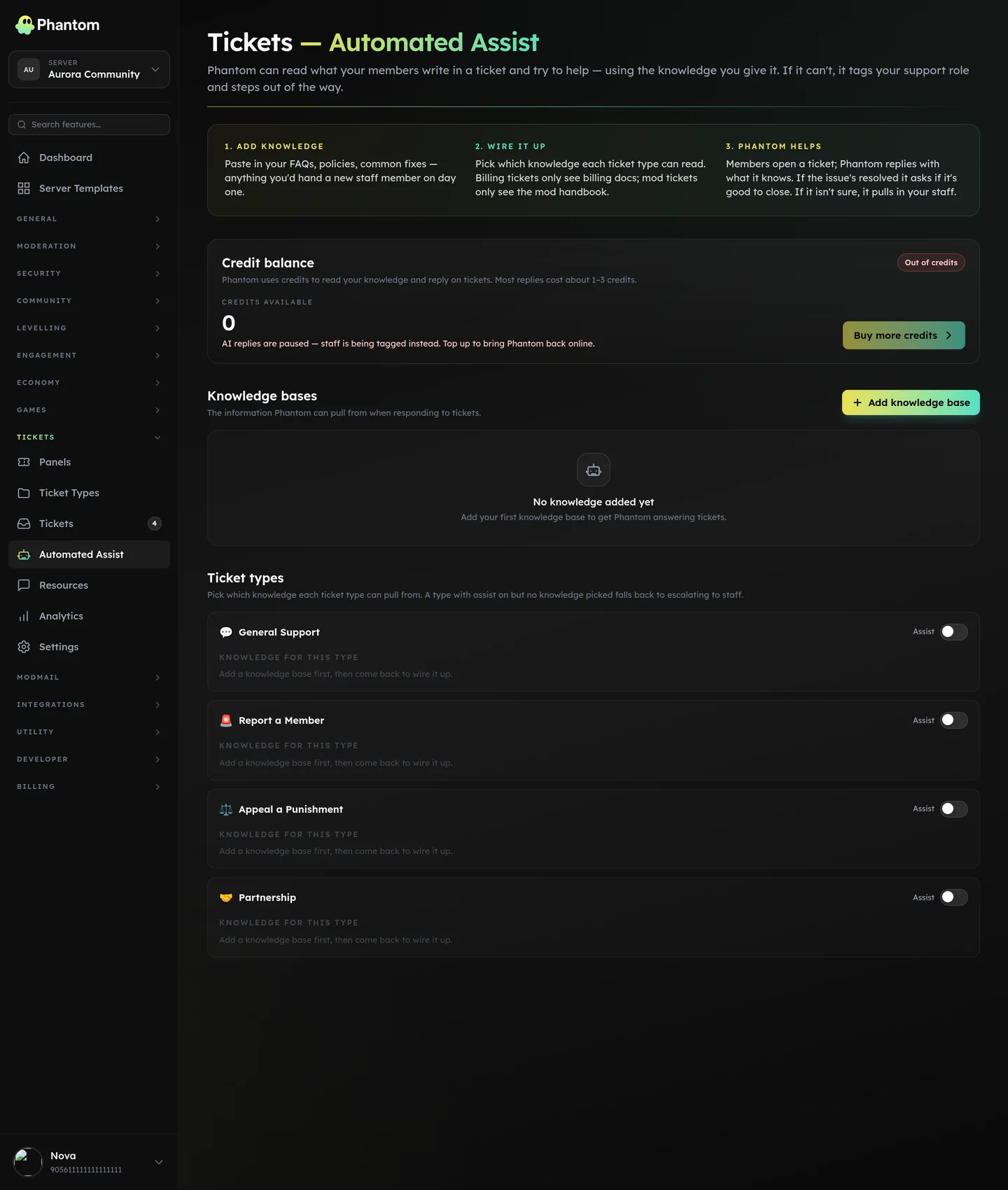 Tickets → Auto-Assist.
How it works
- A member opens a ticket; their first message lands.
- Auto-Assist reads the message + your knowledge base (server-specific FAQs you've uploaded).
- It decides: reply (it's confident enough to answer), ask_for_info (it needs one more piece of info from the user), offer_close (the user signalled the issue is resolved), or escalate (it can't help; staff please look).
- On
reply, it posts the answer in the ticket as the bot. Onescalate, it pings your configured staff role.
Auto-Assist's answers are written by an AI model picked for fast support replies. You don't manage the model — Phantom handles it.
Where it lives
Dashboard: Tickets → Settings → Auto-Assist (global toggle) + per ticket type (knowledge base + behavioural overrides).
Setup
- Open the ticket type you want Auto-Assist on.
- Enable Auto-Assist for that type.
- Upload one or more knowledge bases — markdown documents containing your FAQs / SOPs / known answers.
- Pick a staff role to ping on escalation.
- Save.
The next time a member opens a ticket of that type, the bot reads their message and acts.
Knowledge bases
A knowledge base is a markdown document up to several thousand words long, scoped to your server. Phantom indexes the knowledge base on save and pulls the most relevant sections for the question being asked, so answers cite the right policy.
Good knowledge bases:
- Concrete answers, not pointers ("To reset your password, go to X" not "See our password reset page")
- Written in your support team's voice
- Updated when your processes change
- Cover the 80% of repeat questions, not every edge case
You can have multiple knowledge bases per ticket type — useful for "general policy" + "this specific game's rules" + "billing FAQ" as separate documents.
Big policy / SOP documents
Phantom answers from the most relevant sections it retrieves, not the whole document, so a very large paste is fine — but the more topics one document covers, the more sections compete to be retrieved for any given question. If a large knowledge base is escalating questions it clearly contains, split it into a few topically focused documents (retrieval works best that way), or widen how many sections Phantom pulls per question via the per-type retrieval_top_k override.
What it can't do
- Take actions in your server (it only posts replies, never bans / kicks / changes roles)
- Reach into other tickets (each ticket is isolated)
- Look up real-time info (it only knows what's in the KB)
- Replace your team for anything non-routine
Costs
Auto-Assist is billed through prepaid Phantom AI credits, separately from the Pro subscription. Each AI reply draws from your server's credit balance; when the balance runs out the AI goes quiet until you top up (your human ticket workflow is unaffected). Credit packs are available from the dashboard, and credits never expire.
Tuning behaviour
Two settings per ticket type:
- Escalation threshold — how confident the AI has to be before replying. Higher = escalates more often; lower = answers more often (more false confidence risk).
- Max turns — how many back-and-forths before forced escalation. Default 3. Keeps the AI from looping forever.
- Retrieval breadth (
retrieval_top_k) — how many knowledge-base sections Phantom pulls into context per question. Defaults to a value tuned for typical FAQs; raise it (up to 20) for large policy/SOP knowledge bases where the answering section might otherwise miss the cut and the AI escalates instead of answering.
Audit pane
Each ticket type's settings has a Phantom AI audit view. Shows every AI reply with confidence score, the knowledge-base section it referenced, and the user message that triggered it. Useful for debugging "why did it reply with X?"
Permissions
tickets.view— see Auto-Assist settings + knowledge basestickets.edit— toggle, upload KBs, change behaviour
Privacy
- Ticket messages are never used to train any AI model.
- Knowledge bases are stored encrypted, scoped to your server only.
- No cross-server data ever flows between knowledge bases.
Limits
- Knowledge base: up to a few hundred KB of content per server (the dashboard shows your current usage).
- 12 turns of conversation history per ticket retained as context for the AI.
- A per-server rate limit applies so one busy server can't crowd out others.
Related pages
- Tickets overview
- Panels & types
- Pricing & Phantom Pro — plans + billing