
Verification
Forces new members to complete a challenge before gaining full server access. The single biggest filter against drive-by bot raids.
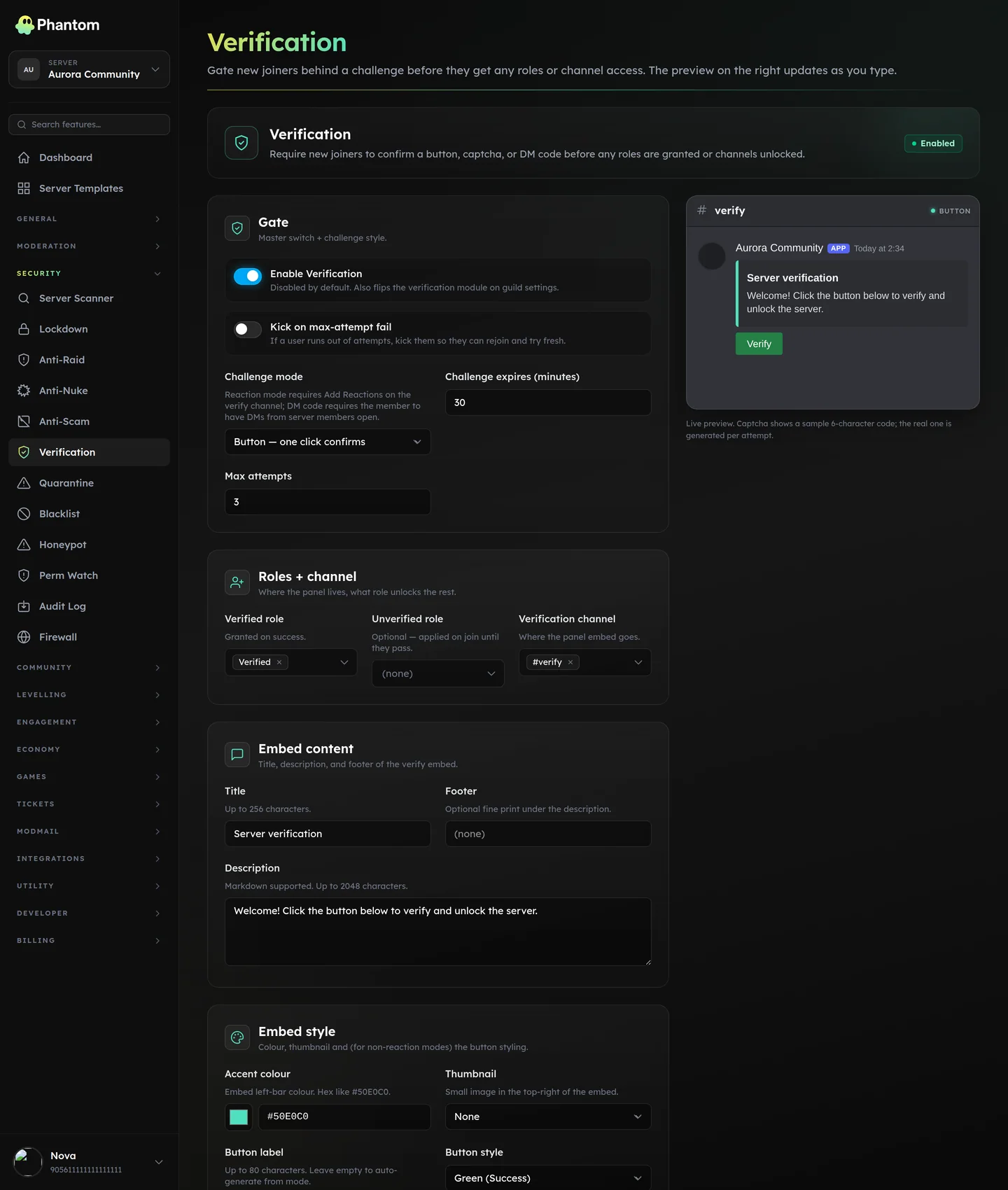 Security → Verification.
Modes
| Mode | Friction | What the user does |
|---|---|---|
| Button | Low | One click on a button in the verify channel. |
| Captcha | High | Solve a generated captcha image. |
| Reaction | Low | React with a specified emoji to the verify message. |
| DM code | Medium | Receive a code via DM, type it back. |
Higher-friction modes catch more bots but also turn away more legitimate users. Pick based on your threat profile.
Settings
| Setting | What it does |
|---|---|
| Enabled | Master switch. |
| Mode | One of the above. |
| Verified role | Granted on successful verification. This is the role that gates access to the rest of your channels. |
| Unverified role | Optional. Granted on join so you can use Discord channel permissions to hide channels from unverified members. |
| Channel | Where the verify panel is deployed. |
| Expire (minutes) | A pending challenge expires after N minutes. Default 30. |
| Max attempts | Failed attempts before the user is locked out. Default 3. |
| Kick on fail | Kick the user instead of locking them out. |
| Message | The text in the verify embed. |
| Title | Embed title. |
| Colour | Hex string (e.g. #50E0C0). |
| Footer | Optional small text. |
| Thumbnail | none / guild_icon / custom_url. |
| Button label | Override the default per-mode label. |
| Button style | primary / secondary / success / danger. |
Setup
- Create the Verified role in Discord. Give it access to channels you want post-verification.
- (Optional) Create an Unverified role for explicit pre-verification channel gating.
- On the dashboard, set the mode + channel + roles.
- Click Deploy to post the verify panel.
- Test by joining the server with an alt account.
Pre-verification channel layout
The recommended layout:
#welcome(default channel for everyone) — has the verify panel and rules.- All other channels — visible only to Verified.
This way, an unverified user (including a bot) sees only #welcome and the verify button. No spam target.
Tips
- Button mode is the right default. Bots have been beating captchas for years; the real value of verification is forcing a click — a vast amount of raid software doesn't click anything.
- Captcha mode is right for high-profile servers willing to accept the friction.
kick_on_fail = trueis the cleanest UX — failed attempts get kicked; legitimate users re-invite and try again.expire_minutes = 30is generous. Tighten to 5-10 minutes on high-security servers.
Multi-bot scenario
If you have multiple verification systems running (Phantom + another bot), the two will conflict. Pick one. Phantom's logs include the configured mode + the actual challenge each user attempted, so you can audit if it's working.
Cross-Server Sync
Verification is NOT yet syncable across networks (channel/role bindings are intricate and the sync would silently break if subscribers' role IDs differed). On the roadmap.
Permissions
security.view— see the page + verification logsecurity.edit— tunables, deploy panel
Behaviour
- Each unverified member has a pending verification attempt until they pass, fail, or it expires.
- Failed attempts feed into Anti-Raid signals — repeated failure looks like a raid.
- Pass → user is granted the Verified role (and stripped of the Unverified role if set).
Related pages
- Anti-Raid — pair with
action = challengeto route raids through verification - Firewall — pre-verification filtering (age, avatar, bot account, etc.)
- Quarantine — for cases where verification fails repeatedly