
Tickets overview
A full support-queue system: members open tickets by clicking a button; staff claim, assign, respond, and close them; transcripts are generated automatically; analytics show how the queue is performing. Optionally, an AI co-worker handles routine questions before a human ever sees the ticket.
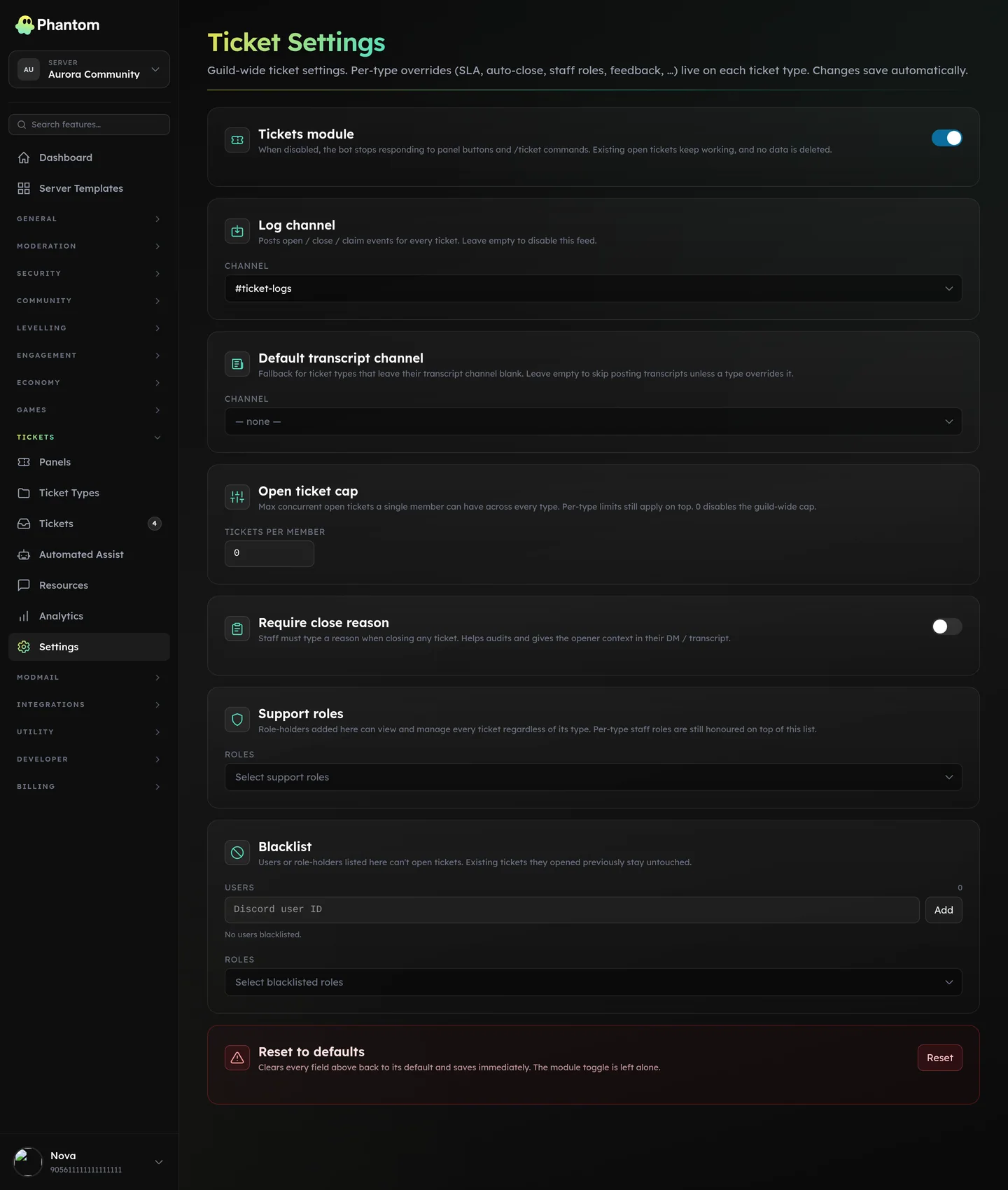 Tickets → Settings.
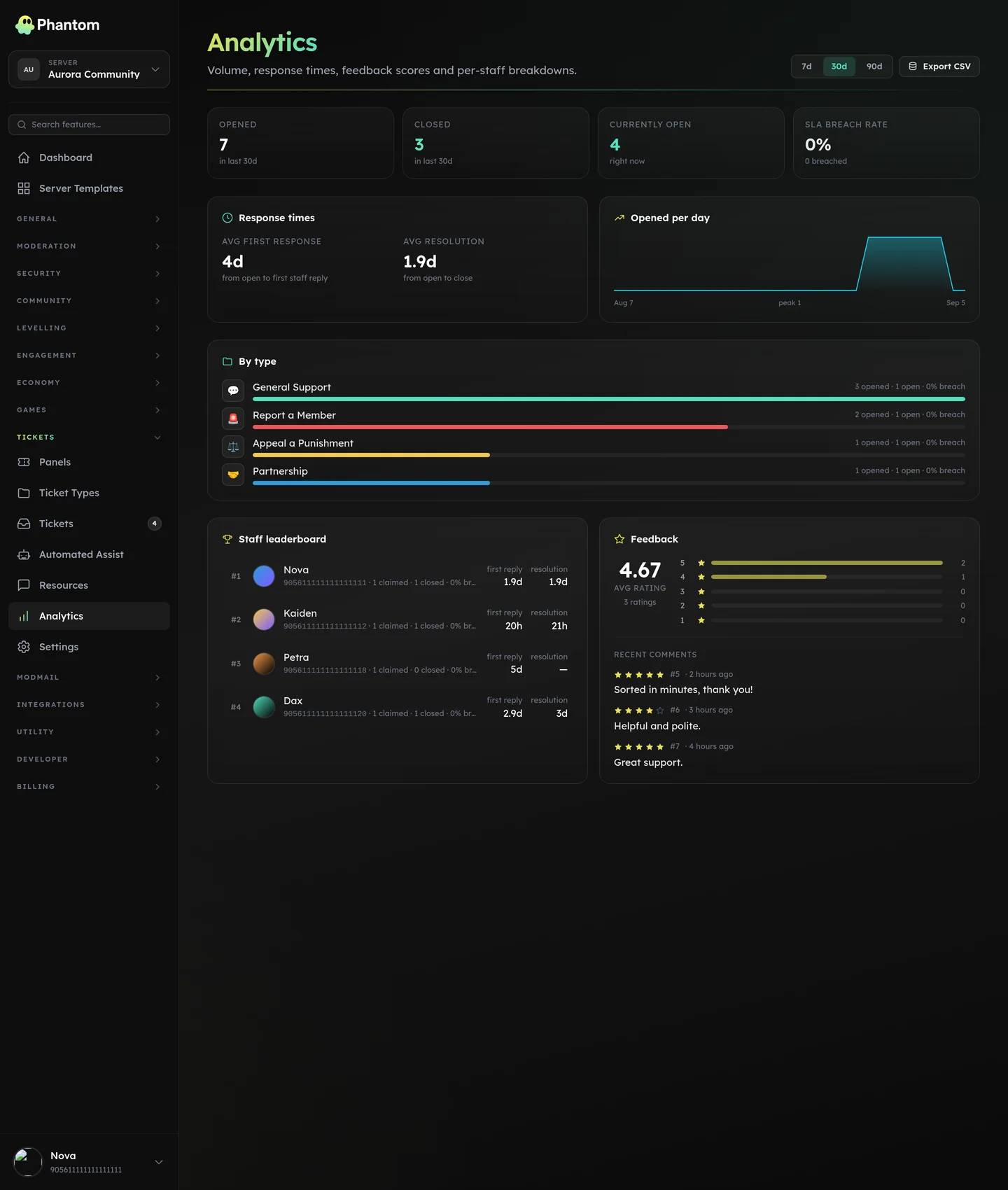 Tickets → Analytics, the health of your support desk over time.
The three pieces
Three concepts work together:
- Panels — message templates that you post in a channel. Each panel has buttons that open ticket types.
- Types — ticket categories. Each type defines its own form fields, staff roles, channel mode, welcome message, transcript settings.
- Tickets — actual support conversations. Open, claimed, assigned, closed, optionally archived.
Where it lives
Dashboard: Tickets. Six sub-pages:
- Panels — design + deploy the buttons.
- Types — define what opening a ticket means (forms, staff, channels).
- Tickets — live list of open / claimed / closed tickets.
- Resources — canned responses + tags for staff productivity.
- Analytics — open rate, resolution time, SLA breach rate, top categories.
- Settings — global module config (defaults, transcript retention, etc.).
Channel modes
A ticket can live as either:
- Channel — a new private text channel created per ticket. Most common.
- Thread — a private thread inside a parent channel. Cheaper on Discord's channel quota; good for high-volume support.
Slash commands (in-ticket)
| Command | What it does |
|---|---|
/ptickets info | Show ticket metadata (status, claimer, opener, message count, etc.). |
/ptickets close | Close the current ticket. |
/ptickets reopen | Reopen a closed ticket. |
/ptickets claim / unclaim | Take / release ownership. |
/ptickets assign | Assign to a specific staff member. |
/ptickets priority | Set low / normal / high / urgent. |
/ptickets pin | Pin so auto-close doesn't touch it. |
/ptickets adduser | Add a non-staff user to the ticket. |
/ptickets removeuser | Remove a user previously added to the ticket. |
/ptickets note | Internal staff-only note. |
/ptickets move | Move to a different type (re-categorise). Re-applies the destination type's welcome-ping configuration. |
/ptickets rename | Pop a modal to rename the ticket channel + set a custom "subject" so the dashboard and search use your wording. |
/ptickets can <name> | Post a canned reply by name. Autocompletes from the per-guild list. |
/ptickets list | List open tickets in this server. |
/ptickets stats | Quick analytics. |
/ptickets transcript | Generate a transcript right now. |
Inside a ticket channel, staff can also fire a canned reply via ?<name> shortcode (e.g. ?welcome). Phantom deletes the trigger message and posts the rendered reply.
Welcome message variables
The welcome message posted when a ticket opens (Types → Welcome message) supports these tokens:
| Token | Becomes |
|---|---|
{server} | Your server name. |
{user} | A mention of whoever opened the ticket. |
{ticket} | The ticket number, e.g. #12. |
{date} | The date the ticket opened, e.g. 23 August 2026. |
{time} | The time the ticket opened, e.g. 20:21. |
{date} and {time} are written in your server's timezone (Settings → Timezone), falling back to UTC if you haven't set one.
Anything else in {braces} is left exactly as typed, so a misspelled token is visible in the posted message rather than silently blank.
Panel variables
The panel embed (Panels → Embed) has its own set, resolved when you publish:
| Token | Becomes |
|---|---|
{server} | Your server name. |
{membercount} | Member count, e.g. 12,480. |
{date} | The date you published the panel. |
{time} | The time you published the panel. |
A panel is one stored message rather than a per-viewer render, so these are a snapshot of your last publish — re-publish the panel to refresh them.
Permissions
tickets.view— see the dashboard pages + ticket list.tickets.edit— manage panels, types, settings; configure auto-assist.
Per-ticket-type staff_role_ids ALSO grant staff abilities — a member with one of the type's staff roles can claim/assign/close/etc. that type's tickets regardless of dashboard permissions. This is the "different staff for different ticket kinds" model.
(Discord's Manage Channels + Administrator are also accepted as legacy fallback paths.)
Limits
Free plan: 1 panel and 2 ticket types per server. Phantom Pro lifts both. If a server drops to Free with more than that already set up, nothing is deleted — you simply can't add another until you're back on Pro.
System limits, on every plan:
- 50 panels per guild
- 50 types per guild
- 5 form fields per type
- 25 buttons per panel
- 90-day transcript retention (configurable up)
- 100 tags per guild, 10 per ticket
- 100 canned responses per guild
- 5 reopens per ticket
Discord's own limits
These are Discord's, not Phantom's, and they apply to every bot:
- 50 channels per category. A busy ticket category reaches this on its own — nobody has to change a setting. Turn on Channel overflow on the ticket type and Phantom handles it (see below). Without it, Phantom keeps opening tickets but places them outside the category, at the top of your channel list — your signal to archive some closed tickets.
- 500 channels per server. At this one no new channel can be created at all, and ticket opens start failing. Closing old tickets is the only fix.
Both are good reasons to leave auto-close on: a ticket category that cleans itself up never reaches either.
Channel overflow
A per-type toggle, under the ticket type's Category picker. Off by default.
When the category is full, Phantom copies it — the name, and every permission overwrite on it — and opens the ticket in the copy. Copies are named after the original (PURCHASE TICKETS (2), (3), …) and fill one at a time. Because the permissions are copied, a copy is exactly as private as the category it came from.
The copy is temporary. Once its last ticket channel is closed or deleted, Phantom deletes the copy. Your own category is never renamed, moved or deleted — only the copies Phantom made, and only ones it has a record of creating.
Worth knowing:
- It is not a substitute for closing tickets. Phantom stops after 10 copies, and the server-wide 500-channel limit still applies.
- A copy is left alone for the first few minutes of its life, so the gap between creating it and putting the first ticket in it isn't mistaken for "empty".
- Deleting a copy yourself is fine — Phantom notices and makes a fresh one next time it needs to.
Defaults
- Auto-close: 3 days idle → warning, another day with no reply → close. Claimed tickets and high-priority tickets are excluded by default.
- Priority: normal.
- Transcript: HTML, hosted by Phantom and accessible via a private link for staff.
Where to go next
- Set up your first panel → Panels & types
- Train your staff workflow → Staff workflow
- Add the AI co-worker → Auto-Assist