
Welcome & Leave
Configurable embeds (and optional dynamic image cards) posted when members join or leave.
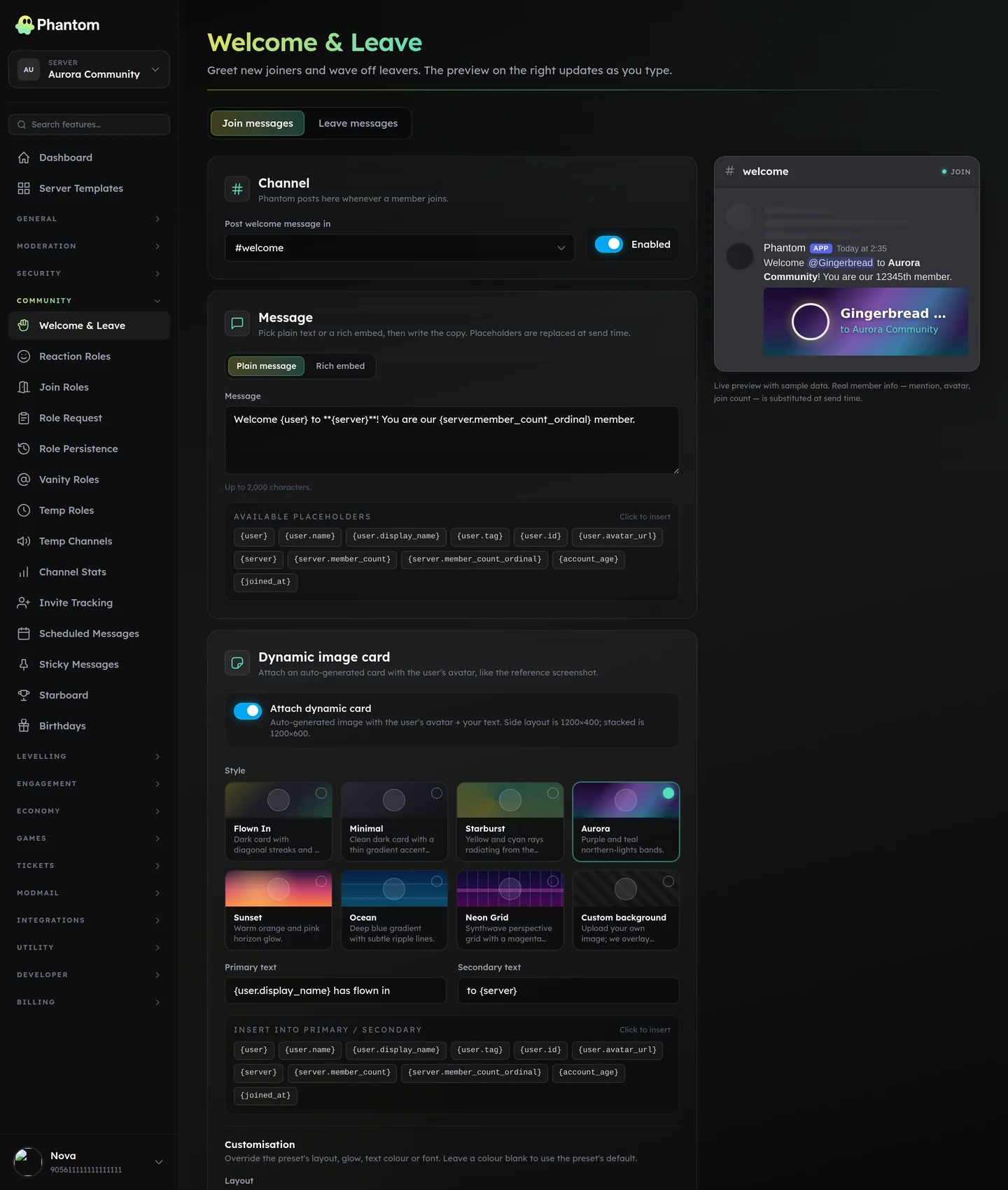 Community → Welcome & Leave.
Where it lives
Dashboard: Community → Welcome & Leave. Separate config for Welcome and Leave.
Modes
- Message — plain text.
- Embed — rich Discord embed with title, description, color, thumbnail, footer.
- Image — a dynamically-generated card image. Built-in presets:
flown-in,minimal,starburst,aurora,sunset,ocean,neon-grid,custom.
You can use multiple modes simultaneously (image + embed).
Settings
| Setting | What it does |
|---|---|
| Enabled | Master switch. |
| Channel | Where the welcome posts. |
| Content | Text content (plain or embed body). |
| Embed customisation | Title, description, color, thumbnail, footer. |
| Image preset | Pick a built-in or custom (then upload your own background). |
| Image layout | Avatar position, text colors, font choices. |
| Send after (seconds) | Delay before posting. 0 = immediate. |
| Delete after (seconds) | Auto-delete the welcome message after N seconds. 0 = keep. |
| Delete on leave | When a welcomed member leaves, delete their original welcome message. |
| Ignore bots | Don't welcome bot joins. |
Placeholders
| Placeholder | Renders |
|---|---|
{user} | Member's display name |
{user.name} | Username |
{user.display_name} | Display name |
{user.mention} | @mention |
{server} | Server name |
{server.member_count} | Total members |
{account_age} | "3 days", "2 years" |
{joined_at} | Timestamp |
Tips
- Mention the new member (
{user.mention}) so they get pinged. - Mention roles / channels by name. Typing
@Membersor#rulesin the welcome body is auto-resolved to a proper Discord mention at send time — see Embed Builder for details. - Pick a preset before going custom. The presets cover 90% of looks; custom backgrounds need pixel-precise design.
delete_after = 60keeps your welcome channel from becoming a wall of old joins.delete_on_leaveis the polite move for people who join and immediately leave — no "welcome to a member who isn't here anymore" graveyard.
Image limits
- Max 4096 KB
- Formats: PNG, JPG, JPEG, WEBP
Permissions
community.view— see the pagecommunity.edit— change settings, upload backgrounds
Related pages
- Join Roles — auto-role on join
- Verification — gate joins behind a challenge
- Role Persistence — restore roles on rejoin