
Staff workflow
A reference for staff handling tickets in chat.
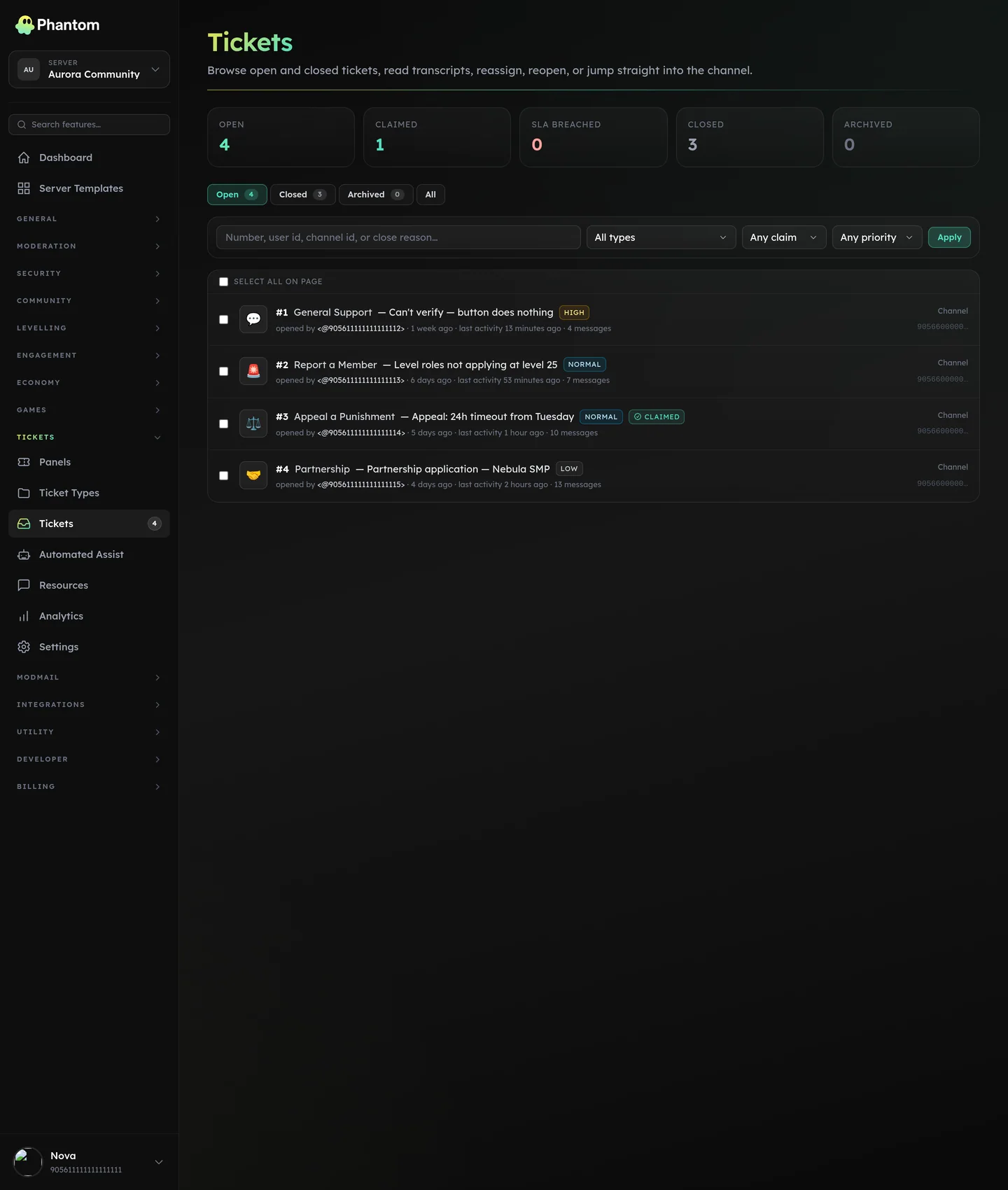 Tickets → All Tickets, the staff queue.
When a new ticket opens
- The ticket appears in your #mod-log (if Logging is on) and in Tickets → Tickets on the dashboard.
- Open the channel/thread. The welcome embed at the top shows the opener's form answers.
- Claim it with
/ptickets claim. Other staff see the claim in the public claim embed. Avoids two people working the same ticket.
Working the ticket
- Just chat normally. Phantom logs every message into the ticket transcript.
- Use canned responses from your team's resources. Two equivalent triggers:
/ptickets can <name>— slash command, autocompletes from your server's list (shows the canned's category).?<name>— shortcode typed straight into the ticket channel. Phantom deletes your trigger message and posts the reply. If you also have a custom command with the same?<name>prefix, the custom command wins — canned responses never silently shadow your existing commands.- When a canned reply is configured to send as staff, it posts under your display name and avatar so it reads like a personal answer.
- Use tags to categorise the ticket for later analytics (e.g. tag a billing ticket as
refundorsubscriptionfor tracking). - Add internal notes with
/ptickets note— staff-visible only, not in the transcript shown to the opener.
Changing the ticket
- Re-categorise:
/ptickets move <type>moves the ticket to a different type. Useful when the opener picked the wrong category. The destination type's welcome-ping config (staff toggle + role subset) is re-applied so a moved ticket pings the same set a freshly-opened one of that type would. - Rename:
/ptickets renamepops a modal prefilled with the current name. Phantom renames the Discord channel / thread and also stores a custom subject so the dashboard, ticket list, and search use your exact wording (Discord strips spaces and casing from channel names; the subject is kept untouched). If the rename to Discord fails or Phantom is missing Manage Channels, the dashboard still updates so you stay in sync. - Add another user:
/ptickets adduser @memberadds them to the private channel. - Remove a user:
/ptickets removeuser @memberrevokes their access to the channel. Won't remove the ticket opener. - Change priority:
/ptickets priority urgent— drives SLA timers + dashboard sorting. - Pin:
/ptickets pin— exempt from auto-close. Useful for long-running tickets.
Closing
/ptickets close[reason] — closes the ticket.- Opener gets a DM with a transcript link and (if enabled) a feedback prompt.
- The channel is auto-archived (channel mode) or auto-locked (thread mode) after a short delay.
- Reopen with
/ptickets reopenif needed, or the Reopen button on a closed ticket in the dashboard.
When a reopen is refused
Two things can block a reopen, and Phantom names which one it is rather than just failing:
- The member already has another open ticket of this type. One open ticket per member per type is a hard rule, so reopening would collide with the newer one. Close that first, then reopen this.
- The ticket has been reopened five times already. That guard exists so a closed spam ticket can't be pulled back into a reopen-close loop.
The reason appears in the same place you clicked, in Discord and on the dashboard alike.
Lock close to staff only
By default both the ticket's opener and staff can close it. A per-ticket-type opener can close toggle (Tickets → Types → edit a type) lets you flip that so only staff (per-type roles, Discord Manage Channels, or the tickets.edit team permission) may close. Existing types default to "opener can close" so behaviour doesn't change unless you flip it.
Claiming + assigning
- Claim = "I'm working this." Self-service.
- Assign = "You'll handle this." External.
- They can diverge. A ticket can be claimed by Alex AND assigned to Beth (for cases where you're working on someone's behalf).
- Unclaim with
/ptickets unclaim. Only the claimer (or staff) can unclaim. - Assigning — from the dashboard or with
/ptickets assign— posts a note in the ticket channel and pings the new assignee, so the assignment lands in their mentions. Unassigning posts the note without a ping.
Auto-assign
Set per ticket type at Tickets → Types → edit a type → Auto-assign. The ticket is both assigned and claimed the moment it opens, so it lands on one person instead of the whole team.
| Mode | Picks |
|---|---|
None | Nobody — the ticket opens unclaimed (default). |
Random | A random staff member. |
Round-robin | The next staff member in rotation, so everyone gets an even share. |
Least tickets | Whoever currently has the fewest open tickets. Ties are broken randomly. |
Candidates come from the type's staff roles, minus bots, minus anyone marked away, minus the person who opened the ticket. If that leaves nobody — no staff roles configured, everyone away — the ticket opens unclaimed exactly as it would under None.
An auto-assigned ticket opens with an Unclaim button, shows the assignee in the welcome embed, and pings the assignee in the ticket channel so they see it straight away. That ping is sent no matter how the type is configured — welcome pings off, a ping-role subset that doesn't include them, or Auto-Assist enabled. The staff roles are not pinged as well: the ticket is already routed, so a role-wide ping would just be noise. Staff can reassign at any time with /ptickets assign or by unclaiming.
Priorities + SLA
| Priority | Suggested response time |
|---|---|
urgent | 15 minutes |
high | 1 hour |
normal | 4 hours |
low | 24 hours |
Phantom tracks first-staff-response time per ticket and surfaces "SLA breached" on the dashboard when configured. SLA settings are per-type.
Pause SLA
/ptickets pause (if granted on your team's setup) marks the SLA as paused — useful when you're waiting on the opener for info and don't want the SLA clock to count against you.
What members see
Members only see the public messages — they don't see notes, system events beyond claim/close, or the staff-only channels.
Analytics
The Tickets → Analytics page shows:
- Open tickets right now (live)
- Median + p95 first-response time per priority
- Resolution time distribution
- Top categories
- Per-staff stats (cases handled, average rating)
Useful for monthly reviews + figuring out where the queue is leaking.
Permissions to staff a ticket
Three independent paths grant ticket-staff abilities:
- Holding a Discord role listed in the ticket type's staff_role_ids (per-type override).
- Having Discord Manage Channels or Administrator.
- Having the
tickets.editteam permission.
Any one suffices. See Team Roles for the new dashboard-driven path.
Related pages
- Tickets overview
- Panels & types
- Auto-Assist — let AI handle the first reply