
Custom Branding (white-label bot)
Run Phantom under your own bot token + name + avatar. Members see your bot, not Phantom — but you get all of Phantom's features.
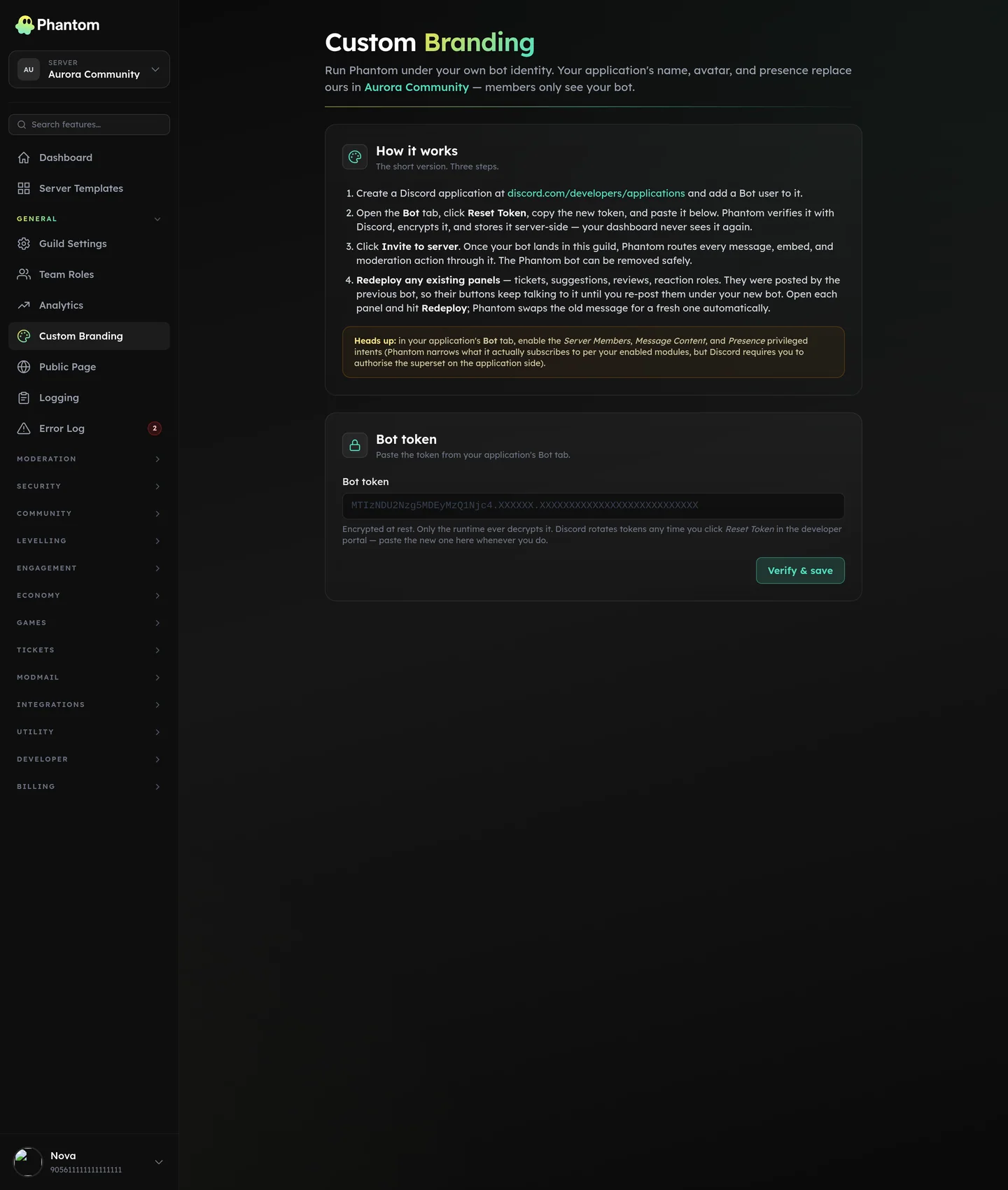 General → Custom Branding.
What it means in practice
- Your server's slash commands are namespaced under your bot's name (the user types
/youbrand kickinstead of/pmod kick). - Welcome messages, ticket replies, mod-action embeds — all show your bot's avatar + name.
- Members never see the word "Phantom" in your server.
Pricing
Custom Branding is a Phantom Pro feature (£4.99/month or £49.99/year per server). Subscribe from Plans & Billing in the dashboard, then paste your bot token and Phantom does the rest.
See Pricing & Phantom Pro for the full plan breakdown.
How it works
- You create a Discord application on the Discord developer portal — your own bot, your own token.
- On the Custom Branding dashboard, paste the bot token.
- Phantom validates the token and fetches the bot's identity (username, avatar, application ID).
- Phantom runs your branded bot on its infrastructure — the token is stored securely and never shared.
- Slash commands re-register under your bot's identity. Members see them as
/yourbrand-*.
Where it lives
Dashboard: Settings → Custom Branding.
Settings
| Setting | What it does |
|---|---|
| Bot token | The token from Discord developer portal. Stored encrypted. |
| Presence | Status (online / idle / dnd) + activity ("Watching the community"). |
Token security
- Tokens are stored encrypted, never logged, and never appear in any dashboard response.
- Token rotation: paste a new one, Phantom validates and swaps within a few seconds.
- If you ever need to revoke access, regenerate the token on the Discord developer portal and Phantom immediately stops being able to act as your bot.
Limits
- 1 custom bot per server, and one server per bot application.
- Token rotation is rate-limited (you can't change it 50 times an hour).
Moving your bot to another server
One Discord application serves one server, so connecting the same bot somewhere else moves it rather than copying it. Phantom handles that for you when the old server can no longer use it — because its Pro plan moved or lapsed — and the success message says the bot was disconnected from the other server.
If the old server still has its own Pro plan, the connection is refused instead: both servers are paying, and one bot can't be in two places. Create a second Discord application for the second server.
Member experience
Members in your server experience your branded bot identically to how they'd experience Phantom's main bot:
- Same commands (renamed)
- Same dashboard (still accessed via
phantombot.gg) - Same response speed
- Same uptime
Switching to or from custom branding is seamless from the member side — no re-onboarding.
Permissions
custom_branding.view— see the current config + bot identitycustom_branding.edit— paste / rotate / clear the token
Tips
- Pick a memorable bot name. Members will see it every day; "MyServer Helper" is less catchy than "Argus" or "Sentinel."
- Set the avatar from your Discord developer portal — Phantom uses the avatar Discord shows for your bot.
- Don't share the token. Treat it like a password. If it leaks, regenerate in the Discord developer portal and paste the new one here.
Troubleshooting
My custom bot stopped working after I moved my Pro plan
Expected, and reversible. Custom Branding is a Pro feature, so your bot only serves a server while that server has Pro. When you move the plan, the bot stands down on the old server and the main Phantom bot takes over there — so make sure Phantom's own bot is still in that server. To carry your bot across, open Custom Branding on the server the plan moved to and paste the same token; Phantom disconnects it from the old server as part of the save.
"This application failed to respond"
Discord shows this when a command isn't answered within three seconds. With a custom bot there are two usual causes, and the dashboard tells you which one you have.
You ran the main Phantom bot's command. Phantom's own bot often stays in the server after you connect your own, and its /p… commands stay in the picker alongside yours. It stands down in a custom-branded server — it now replies saying so and points you at your bot. Type the command again and pick the one whose icon is your bot, or remove Phantom's bot from the server so there's no ambiguity.
Your bot has no commands of its own. A bot invited without the applications.commands scope connects, shows Online and honours the status you set — but Discord never lets it register commands. The Custom Branding page shows Commands unavailable when this happens. Fix it with the Invite to server button on that page (its link carries the right scope), then give it a minute — Phantom retries the registration on its own.
Freshly registered commands can also take a few minutes to show up in Discord's picker the first time. If the pill says Online with no warning, the commands are registered and it's just propagation.
Commands stopped working after they'd been fine
Check the pill on the Custom Branding page:
- Commands unavailable — the bot lost the
applications.commandsscope (usually re-invited without it). Re-invite from the page. - Action needed / Token rejected — fix the intents or paste a fresh token.
- If Phantom Pro lapsed, your custom bot stands down and Phantom's main bot takes the server back over. Both bots now say so when someone runs a command, and nothing you've configured is deleted — reactivating Pro hands the server straight back.
Related pages
- Pricing & Phantom Pro — plans + what Pro unlocks
- Auto-Assist — also a premium feature