
Anti-Scam
Scans message images for visual scam patterns — fake Discord login pages, fake Steam giveaways, crypto airdrop screenshots, fake Nitro offers — using AI image analysis. The companion to keyword-based scam detection in Automod → Links.
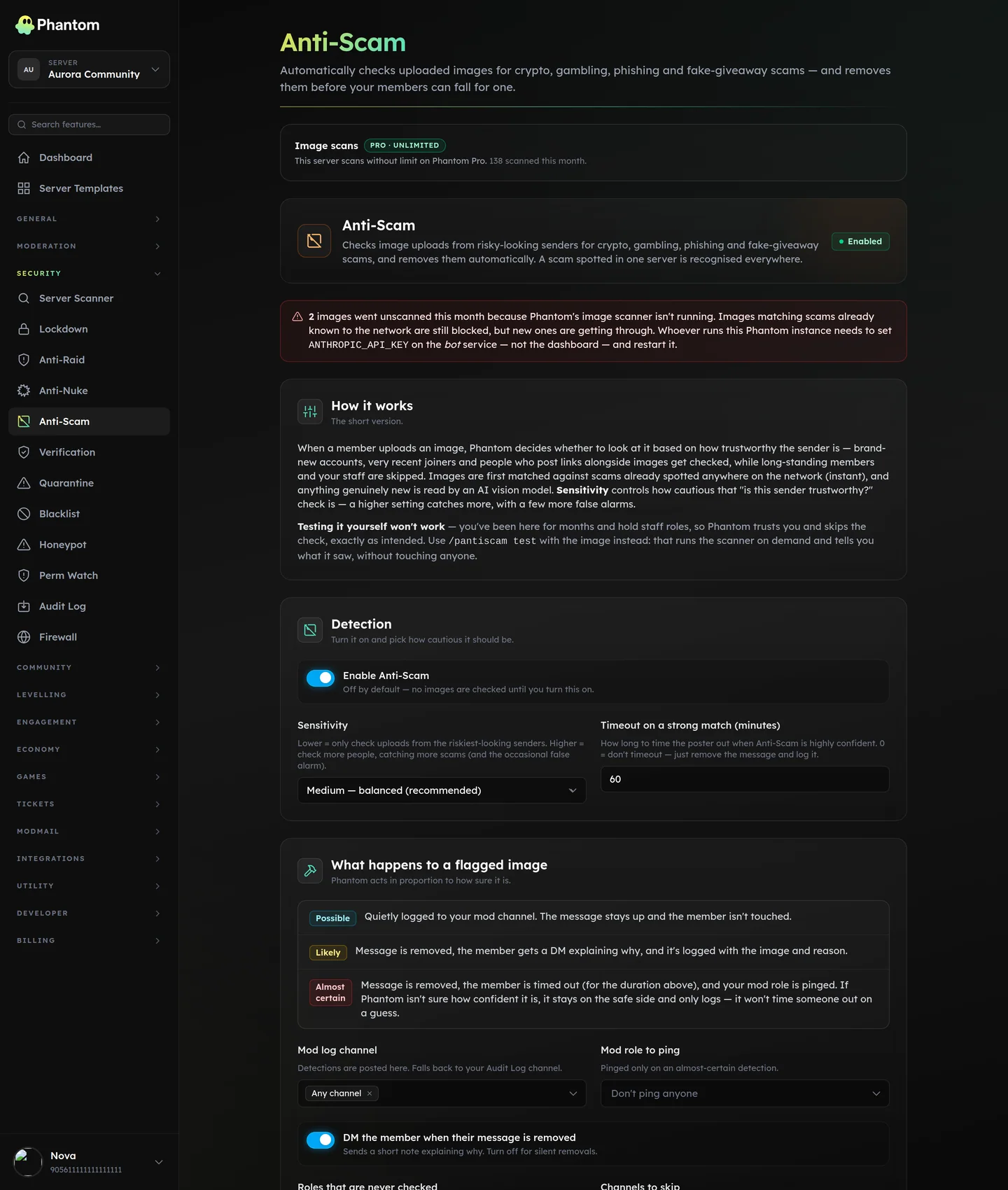 Security → Anti-Scam, with the monthly scan meter.
Why this exists
Modern Discord scams are increasingly image-based: a "fake official Steam giveaway" screenshot that links out via the image's text, not via a URL in the message. Keyword automod can't catch this. Anti-Scam looks at the image itself and flags suspicious ones.
Settings
| Setting | What it does |
|---|---|
| Enabled | Master switch. |
| Sensitivity | low / medium / high. Controls how suspicious a message has to look before Phantom takes a closer look at its images. Higher = scans more aggressively. |
| Log channel | Where to post detections. Falls back to the Audit Log channel, then the master log channel. |
| Mod role | Pinged on a high-confidence hit. |
| Timeout (minutes) | Applied on a high-confidence detection. 0 disables (downgrade high → delete + log only). |
| DM user | Whether to DM the offending member explaining the removal. |
| Exempt roles | Members holding any of these are never scanned. Useful for trusted staff who legitimately post screenshots. |
| Exempt channels | Channels excluded from scanning entirely (e.g. a crypto-discussion channel where reward screenshots are on-topic). |
How sensitivity works
Phantom uses a quick trust check (account age, message rate, attachment patterns, etc.) to decide which messages warrant a deeper look. The sensitivity setting controls how aggressive that check is:
low— only messages that look very suspicious get a deeper look. Catches fewer false positives.medium— balanced. Most servers should start here.high— almost every image in chat gets a deeper look. Catches the most scams.
One exception: the multi-channel blast
Trust is about who someone is — how old the account is, how long they've been here, how much they've posted. It can't see what they're doing right now, and the scam wave that hurts most comes from an account the trust check likes: a regular whose account got compromised, with a year of history and a stack of roles.
So behaviour overrides reputation. When one member puts images into three or more channels inside a minute, every image in that burst is scanned regardless of sensitivity and regardless of how trusted they are. Nothing short of an exempt role or an exempt channel stops it. Cross-posting a screenshot to two channels doesn't count — that's a normal thing to do.
The detection log names the pattern when it fires, so a mod reading it knows to check the other channels rather than assuming it was a one-off.
Tips
- Medium is the right default for most servers.
- Exempt your art / screenshot channels so legitimate uploads aren't scanned unnecessarily. Note that an exempt channel is exempt from the multi-channel blast rule too — posts there don't count toward the burst and aren't scanned.
- Pair it with an Automod → Repeat spam rule with cross-channel detection on. Anti-Scam removes the images it scans one message at a time; the spam rule is what sweeps the rest of the burst out of the other channels.
- Pair with the mod-role ping if your community can handle the noise — staff seeing "scam screenshot from @user" near-real-time is a powerful signal.
- DMs are user-friendly. A first-time poster getting their image silently removed is confused; a DM explanation prevents repeat-offending.
Cross-Server Sync
Syncable settings (when security sync is on):
- Enabled toggle
- Sensitivity
- Timeout duration
- DM user toggle
The log channel, mod role, exempt roles, and exempt channels stay local per server.
Cost
Anti-Scam is available on every plan. Free servers get a monthly allowance of 250 image scans; Phantom Pro removes the cap — scanning is unlimited.
Permissions
security.view— see detection logsecurity.edit— change settings
What gets checked
Phantom checks an image however it reached the channel:
| How it was posted | Checked |
|---|---|
| Uploaded as a file | Yes |
| Forwarded from another message or server | Yes — the image inside the forward is checked, even though the forwarded message carries no attachment of its own |
| Posted as a link that Discord previews | Yes — checked when Discord finishes loading the preview, a moment after the message is sent |
| Edited into an existing message | Yes |
| Videos, or an image on a site Discord couldn't preview | No |
The detection log says which of these it was, so a forwarded or linked scam reads differently from an uploaded one at a glance.
Which channels
Every channel Phantom can see, including a voice channel's built-in text chat, stage channel chat, threads and forum posts. There is nothing to switch on per channel — but Phantom has to be able to see the channel.
This is the usual reason a voice chat looks unprotected: voice channels are often locked down, and if Phantom is missing View Channel there, Discord never delivers it those messages at all. Run /pantiscam diagnose in the channel you're worried about and it will tell you exactly what's in the way — permissions, the skip list, the monthly allowance, or nothing at all.
To delete a scam image it also needs Manage Messages in that channel, and Timeout Members server-wide to time the poster out.
Behaviour
- Each image is checked once, no matter how many edits or previews arrive for the same message. One scam image is never actioned twice.
- A per-message rate limit prevents one spam wave from causing a flood of scans in a few seconds.
- Detection logs are kept for 30 days, then auto-pruned.
When scanning is unavailable
Image scanning is never silently skipped. The page counts every image Phantom wanted to scan and couldn't, and shows a red banner with that number when it happens.
Two different things can be behind it:
- The monthly allowance is used up on a free server. The scan meter at the top of the page shows how many of the 250 are gone and when it resets. Upgrading to Pro removes the cap.
- The scanner isn't running. Images matching scams the network already knows are still blocked, but new ones get through. This one is for whoever runs the Phantom instance, not for you — the banner names the setting that's missing.
Either way, the rest of Anti-Scam keeps working. Known-scam matching, the detection log and the configured actions are unaffected.
Related pages
- Automod → Links — text-based scam URL detection
- Automod → Attachments — block image types entirely
- Auto-Assist — AI ticket helper
- Pricing & Phantom Pro — plans + what Pro unlocks