
Birthdays
Phantom can wish your members a happy birthday automatically. Members save their own date, and on the day Phantom posts a celebration in a channel you choose — optionally handing out a special "birthday" role for the day.
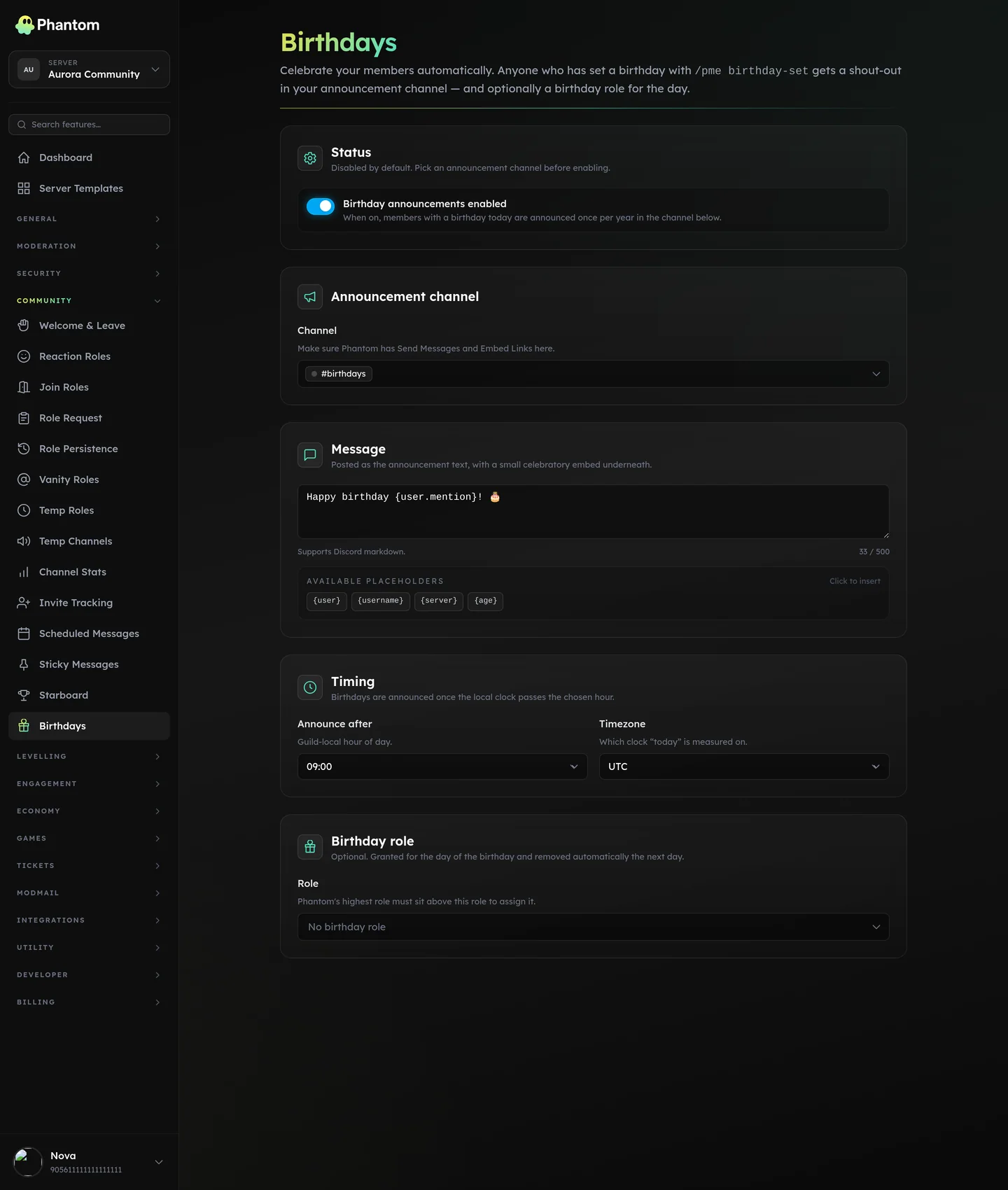 Engagement → Birthdays.
How it works
- A member saves their birthday with
/pme birthday-set. - On that date, in your server's timezone, Phantom posts your birthday message in the announcement channel.
- If you've set a birthday role, the member wears it for the day and Phantom takes it back off afterwards.
Each member is celebrated once per year — no repeat posts, even if the bot restarts during the day.
For members
/pme birthday-set <date> [hide-year]— save your birthday.2000-05-15saves the full date, and your age shows in the announcement.05-15saves the day and month only. Your birth year is never stored, so no age can be shown.hide-year: truedoes the same thing to a full date, which is how you strip the year off a birthday you already saved.
/pme birthday-view [user]— see your own saved birthday, or check another member's. Birthdays saved without a year show as just the day and month. This reply is public.
Setup (admins)
Open Dashboard → Community → Birthdays and configure:
| Setting | What it does |
|---|---|
| Enabled | Master switch for birthday announcements. |
| Announcement channel | Where birthday messages are posted. Required for announcements to run. |
| Message | The birthday message. Supports placeholders (see below). |
| Birthday role | Optional. A role given to the birthday member for the day and removed automatically afterwards. |
| Announce hour | The hour of the day (0–23) after which the day's birthdays are posted. Default is 9 (9 AM). |
| Timezone | The timezone that decides when "today" starts and when the announce hour lands. Default is UTC. |
Make sure Phantom can Send Messages (and Embed Links) in your announcement channel, and — if you use a birthday role — that the role sits below Phantom's highest role so it can be granted.
Message placeholders
Use these in your birthday message and Phantom fills them in:
| Placeholder | Becomes |
|---|---|
{user} | A mention of the birthday member. |
{username} | Their display name. |
{server} | Your server's name. |
{age} | The age they're turning. Blank when the member saved their birthday without a year — write the message so it still reads correctly, e.g. Happy birthday {user}! 🎂. |
Only the birthday member is pinged — the message can't be used to mass-mention the server.
Good to know
- Birthdays are posted shortly after your announce hour, not to the exact second — give it a few minutes.
- A member born on 29 February is celebrated on the 29th in leap years and on 28 February in other years. This holds for year-less birthdays too.
- Members who save a birthday without a year are announced exactly like everyone else — the announcement just drops the "turning N" line.
- The birthday role is removed automatically once the day has passed. If you turn the module off mid-celebration, any leftover birthday role is still cleaned up.
- If the announcement channel is missing or Phantom can't post there, that member is retried later once it's fixed.
Related pages
- Personal preferences — the full
/pmetoolkit - Temp Roles — for other time-limited roles
- Welcome & Leave — greet members when they join