
Player Reports
Give members a proper way to report each other. /pmod report opens a card in your staff channel with the reported message, the reason, and buttons to claim it, act on it and close it — so a report is a tracked job rather than a message someone might scroll past.
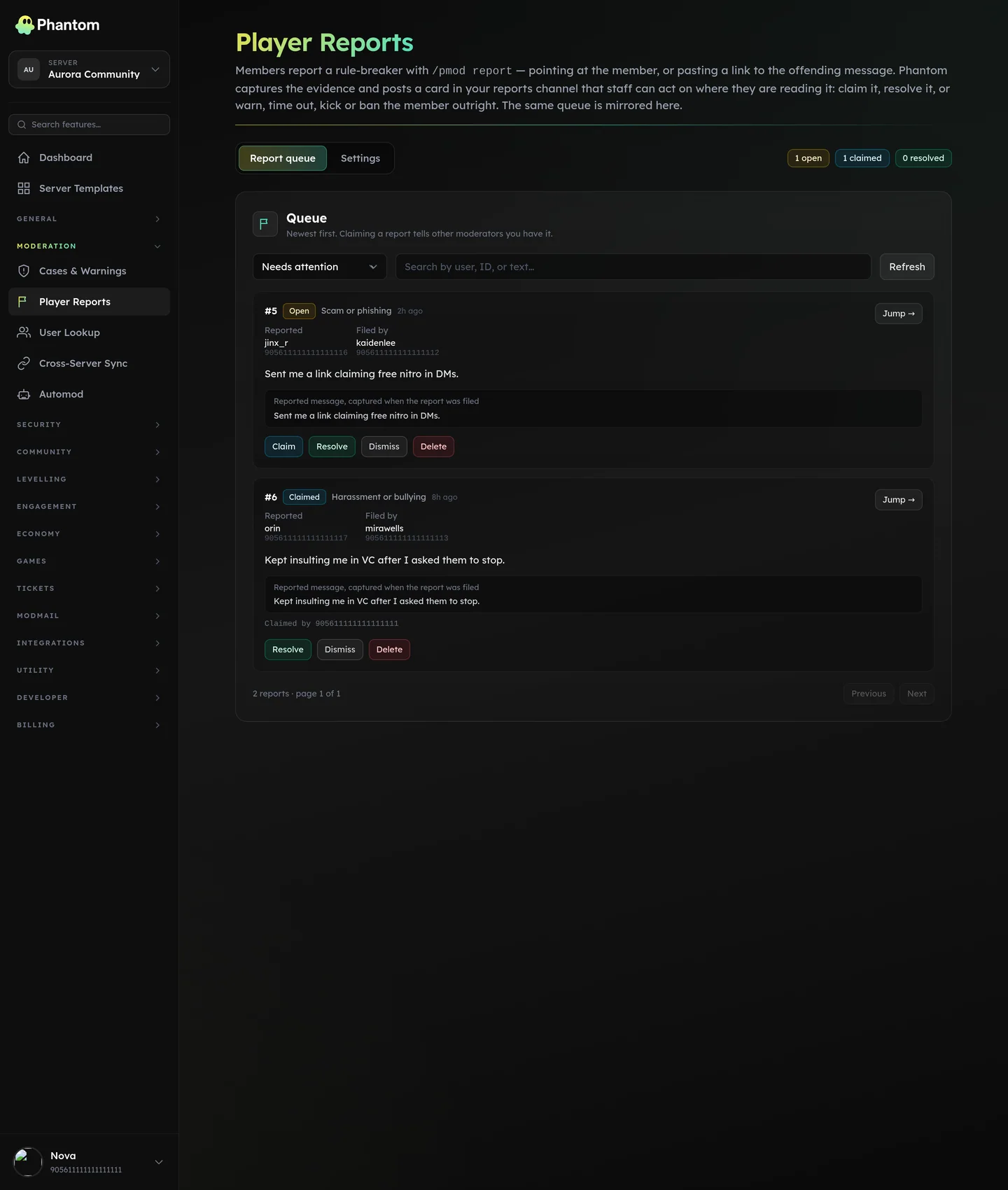 Moderation → Player Reports, the queue every
 /pmod report lands in.
Where it lives
Dashboard: Moderation → Player Reports. Member command: /pmod report.
How a report works
- A member runs
/pmod report <target> <reason> [comment]. The target is a mention, a user ID, or a link to the offending message. - Phantom checks they're allowed to report (see Who can report), then posts a card into your report channel and pings the roles you chose.
- The card carries the reporter, the reported member, the reason, any comment, and — when a message link was given — an excerpt of that message with a jump link.
- A moderator presses Claim so nobody doubles up, acts, then Resolve or Dismiss with an optional note.
- The reporter gets a DM receipt when they file, and another when it's closed.
Every report also lands on the dashboard queue, filterable by status, so nothing is lost when the channel scrolls.
Acting from the card
With Moderation actions on, the card carries Warn, Timeout, Kick and Ban buttons. Pressing one opens the same flow as the slash command, files a proper case, and writes the case number back onto the report.
Each button re-checks the moderator's own permission for that specific action, so a trial mod who can warn but not ban sees the same answer here as they would from /pmod. With Resolve on action on (the default), the report closes itself the moment an action lands — a banned member shouldn't leave an open job in the queue.
Who can report
| Setting | What it does |
|---|---|
| Allowed roles | Empty means every member can report. Set roles to make reporting a privilege. |
| Blocked roles | Always wins over the allowed list. For members who've abused the system. |
| Cooldown | Seconds between one member's reports. Default 120, max 86,400. |
| Minimum account age | Days old a Discord account must be. 0 = off. |
| Minimum server tenure | Days a member must have been in the server. 0 = off. |
| Max open per reporter | How many of one member's reports may sit unresolved at once. Default 5. Stops one person burying the queue. |
| Require a comment | Make the free-text comment mandatory alongside the reason. |
| Allow reporting staff | On by default — a member being abused by a moderator needs this. Turn it off if it's being used to snipe at staff. |
Settings
| Setting | What it does |
|---|---|
| Enabled | Master switch. Phantom refuses to enable the module without a report channel, since reports would go nowhere. |
| Report channel | Where cards are posted. Staff-only. |
| Ping roles | Pinged once per new card. |
| Reasons | The list offered by the command, in your order. Up to 25 (Discord's limit on a choice list), 100 characters per label. |
| Anonymous to staff | Hides the reporter's name on the card. Their ID is still recorded and still shown on the dashboard — this is about who's in the room when the card is read, not about untraceable reports. |
| DM receipt | Confirm to the reporter that the report landed. |
| DM on resolve | Tell the reporter the outcome when it's closed. |
| Moderation actions | Put Warn / Timeout / Kick / Ban on the card. |
| Resolve on action | Close the report automatically once an action lands. |
| Auto thread | Open a thread under each card for staff to discuss in. |
| Log to notes | Also file a staff note against the reported member, so the report shows in /pmod notes and the User Lookup timeline. |
Reason slugs are stable once reports have been filed under them: renaming a label is safe, but the underlying value stays put so old reports keep their category.
Statuses
| Status | Meaning |
|---|---|
| Open | Filed, nobody has picked it up. |
| Claimed | A moderator has taken it. |
| Resolved | Handled, with an optional resolution note. |
| Dismissed | No action needed. |
A report can only be closed once. If two moderators press Resolve at the same moment, the second gets told it's already handled rather than silently overwriting the first.
Permissions
moderation.view— see the Player Reports page and the queue.moderation.reports— claim, resolve and dismiss, from the card buttons and the dashboard. Grant this to trial moderators who should work the queue without holding kick or ban.- The individual action buttons check
moderation.warn,moderation.timeout,moderation.kickandmoderation.banseparately.
Phantom needs permission to post in the report channel, and the usual moderation permissions for whichever action buttons you enable.
Tips
- Point the report channel somewhere staff actually read. A dedicated
#reportsbeats burying cards in general staff chat. - Keep the reason list short. Eight options people understand beat twenty they have to read.
- Turn on Log to notes if you want a member's report history to surface during a later moderation decision.
- Leave Allow reporting staff on unless it's actively being abused. It's the escape hatch that makes the system trustworthy.
Related pages
- Cases & warnings — what an action from a report card files
- User Lookup — a member's full history in one view
- Safeguarding — the separate, escalation-focused route for abuse and child-safety concerns
- Team Roles & permissions — who can work the queue